

You'll need to keep paying your phone bill to prevent mobile service interruptions. Luckily, paying your AT&T bill is simple. The cell phone carrier giant gives customers several avenues to pay their bills, including online or by phone.
There are a couple of ways to pay your AT&T bill:
- Log into your account using a web browser or the myAT&T app for Android and iOS.
- Dial (800) 331-0500 from any phone or *PAY (*729) on your AT&T handset (use *PAGAR or *72427 for Spanish).
Whether you're a new customer entering credit card information for the first time, a long-time user changing payment methods, configuring your autopay, or something else, here's how to pay your AT&T bill online or over the phone.
Are you paying too much for your cell phone plan?
You’re not alone—the average American overspends by $110/month on their phone bill. Worse, AT&T continues to raise its prices. Check out our Mobile Overspending Report to learn how to save hundreds of dollars on your monthly phone bill.
Better yet, check out our six tips to lower your AT&T bill.
How do you pay your AT&T bill online?
You can easily log into your AT&T account via a web browser on your laptop, desktop, tablet, or computer. Here's pay your AT&T Wireless bill online:
- Head to AT&T's website and sign in to your myAT&T account if prompted.
- Select the bill you wish to pay (if you have multiple accounts, you'll need to choose each bill separately).
- Review your payment amount.
- Select your payment method (choose Split this payment to use multiple payment methods or pay on different billing dates).
- Enter payment method details.
- Select Continue.
- Review your payment details and confirm.

.png "How to Pay Your AT&T Bill Online or by Phone - Bill payment summary where you can split billing payment")
AT&T accepts the following methods of payment for online transactions:
- Credit or debit card (Visa, Mastercard, American Express Card, Diners Club, JCB, or Discover Card)
- Apple Pay
- PayWithMyBank
You can also pay with the following options while signed in to your myAT&T account:
- Checking or savings account
- AT&T promotional gift card
- Mastercard Click to Pay
- BitPay
For prepaid accounts, things work differently. Here's how to pay your AT&T prepaid bill online:
- Head to the AT&T prepaid website.
- Enter your AT&T prepaid login credentials.
- Choose Make a Payment from the top menu bar.
- Input your desired payment amount and click Continue (before moving on, you can add an AT&T prepaid refill card or offer code).
- Review your order summary and pick your preferred payment method (credit card, debit card, checking/savings account, PayPal, or Venmo). Click Continue if everything looks correct.
- Hit Submit on the bottom of the order screen to finish paying your AT&T prepaid bill.


Pro tip: Use autopay for ease and added savings
While you can easily log in to your account at any time to pay your cell phone bill, we recommend opting into autopay. Setting up a recurring payment ensures you won't have an unpaid cell phone bill and be without service. Additionally, most carriers, including AT&T, offer a discount for setting up autopay. On average, you'll save anywhere from $5 to $10 on your monthly bill with autopay.
How do you pay your AT&T bill via the myAT&T app?
If you've installed the myAT&T app (available for Android and iPhone), you can easily pay your AT&T bill on your phone. Let's look at how to pay your bill using the myAT&T mobile app:
- Download the myAT&T app on Android or iOS.
- Sign in to the myAT&T app with your account credentials.
- Pick the bill you wish to pay.
- Input your payment information: The dollar amount (usually this is automatically entered as the full amount) and the date you wish to issue payment.
- Select your preferred payment method and follow the prompts to continue.
- Review your payment details and submit payment when finished.


If you are using your checking account to pay your bill, the myAT&T app even has a feature that allows you to scan your check using your camera phone to grab all the necessary banking details. You can use the following payment methods in the myAT&T app:
- Credit and debit cards
- Apple Pay
- AT&T promotional gift cards
- BitPay
- Bank account withdrawal (checking and savings account)
- Scanning a check
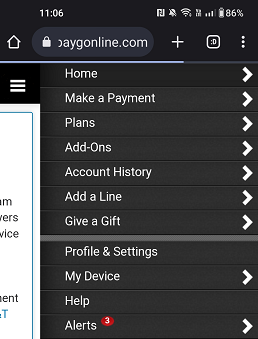
As an AT&T prepaid subscriber, I tried logging into the myAT&T app, which redirected me to the AT&T Prepaid website. Here are the steps I took to pay my AT&T prepaid bill:
- Tap the burger menu icon in the top right-hand corner of the screen.
- Select Make a Payment.
- Enter the amount you want to pay and tap Continue.
- Review your payment amount and choose a payment option (credit/debit card, PayPal, or Venmo).
- Hit Continue again, and press Submit when you're finished.


How do you pay your AT&T bill by phone?
You can easily contact AT&T customer service over the phone for various needs, including changing a plan, initiating an AT&T transfer of billing responsibility, or paying your monthly bill. Just call (800) 331-0500 from any phone and follow the prompts to get to the right menu.
This might vary based on whether you're an AT&T prepaid or postpaid customer, but it should be menu option 1 or 2. You should be able to say something like, "pay my bill," to start the process. For my AT&T prepaid plan, it was menu option 1. We recommend having your bill for reference and your payment information, like a credit card or bank routing number, ready. For instance, you'll likely need your AT&T billing account number on hand.
If you're using your AT&T wireless phone to pay your bill, you can simply dial *PAY (*729) to call AT&T's express bill processing system. For Spanish, use *PAGAR (*72427). The system automatically accesses your account info because you're calling from your AT&T handset. Then, just follow the prompts to pay your bill.
Can you pay your AT&T phone bill without logging into your account?
If you don't want to log into your AT&T account to pay your bill, you've got a few options:
- Fast Pay lets you pick your AT&T service (i.e., cellular, internet, etc.), enter your phone number or account information, zip code, and payment details.
- You can visit an AT&T store in person to pay your bill. To find an AT&T brick-and-mortar location near you, use our handy dandy store locator).
- AT&T accepts checks in the mail, which requires no login (you can find out where to mail a payment on AT&T's website).
Change your AT&T plan
One of the main reasons many folks (myself included) stick with AT&T is Big Blue's impressive roster of plans. Whether you want a maxed-out cell phone plan with truly unlimited high-speed data and a generous mobile hotspot allowance, budget-priced limited plan, or something in-between, AT&T has you covered. You can also add a line to your AT&T plan.
The best AT&T plans include Premium 2.0, Extra 2.0, and Value 2.0. You can always save on your cell phone bill with one of the best AT&T family plans to enjoy a multi-line discount. And depending on your lifestyle, a cheap low-data plan could work—just check your data usage with AT&T to determine your monthly average. Check out AT&T's popular phone plans to find an option that's right for you:
|
#1
|
AT&T

Value 2.0℠
$50.00/mo
+ $35 Upfront
|
|
#2
|
AT&T
Extra 2.0℠
$70.00/mo
+ $35 Upfront
|
|
#3
|
AT&T
Premium 2.0℠
$90.00/mo
+ $35 Upfront
|
Switch to save on your AT&T bill
Consider a smaller carrier if you're paying too much for your AT&T bill. An AT&T MVNO or mobile virtual network operator doesn't operate its own network but instead piggybacks off Big Blue's towers. Therefore, you'll enjoy the same reliable service for a lower monthly price on average. Our favorite AT&T MVNOs include Cricket Wireless, Boost Mobile, and Consumer Cellular. Peruse the most popular small carriers powered by AT&T below:
|
#1
|
Good2Go Mobile

10GB Data 6-Month Plan Unlimited Talk & Text
$13.50/mo
Pay $81 for 6 months (or $13.50/mo.)<br>regular rate is $162 for 6 months (or $27/mo.)
|
|
#2
|
Cricket

3-Month Unlimited Plan
$15.00/mo
$45 advance payment for 3 months (equals to $15/month)<br>regular rate for 3 months is $120 (equals to $40/month)
+ $9.99 Upfront
|
|
#3
|
PureTalk

Unlimited Data w/ 2GB Hotspot Plan
$15.00/mo
|
|
#4
|
Red Pocket

Plus Monthly Plan (GSMA)
$20.00/mo
|
|
#5
|
FreeUP Mobile

Value 3 Month Plan
$20.00/mo
$60 advance payment for 3 months (equals to $20/month). Plus taxes & surcharges
|
|
#6
|
Straight Talk

$25 StraightSAVINGS! Plan
$25.00/mo
+ $4.88 Upfront
|
|
#7
|
TracFone

10GB Data 1-Month Smartphone Plan
$25.00/mo
with Auto-Refill discount for the first 2 months
+ $4.99 Upfront
|
Bundle and save
One of the best ways to save on your monthly bill is with an AT&T phone and internet bundle. AT&T home internet customers can save up to a solid 25% on their monthly bill by tacking on an unlimited data plan. Because Big Blue's bundle discounts let you pick from any of its unlimited plans (Premium 2.0, Extra 2.0, or Value 2.0), you've got loads of choices. Explore the best AT&T phone and internet bundles to start saving.
FAQs
How can you pay your AT&T cell phone bill?
You can pay your AT&T phone bill online via a web browser, using the myAT&T app for Android or iOS, over the phone, in the mail, and in person at an AT&T store.
What payment methods does AT&T accept?
AT&T accepts several online payment methods, including debit cards, credit cards, Apple Pay, and PayWithMyBank. If you're logged into an AT&T postpaid account, you can also use checking accounts, savings accounts, AT&T promotional gift cards, and BitPay. AT&T prepaid customers can use debit cards, credit cards, AT&T promotional gift cards, PayPal, and Venmo.
Can you pay your AT&T phone bill without logging into an AT&T account?
Yes, you can pay your AT&T bill without logging into an account using AT&T fastpay, dialing in by phone, mailing in a payment, or popping into an AT&T store.
Can I text AT&T to pay my bill?
Yes, you can text AT&T to pay your bill online using TXT-2-PAY.
Is there an AT&T app to pay my bill?
Yes, the myAT&T app lets you pay your bill online from your cell phone. However, it redirects AT&T prepaid customers to its prepaid website customer portal rather than using the myAT&T app.
Moe Long
Senior Writer

Find a better phone plan
Thousands of cell phone plans unpacked. All the facts. No surprises.


.png?w=280&h=280&usm=20&usmrad=0.8&fit=crop "Best Cell Phone Deals for July 2026: Get the New iPhone 17 for Free")



