

Your Mint Mobile wallet is a digital balance system you can access through your Mint account. Rather than digging out your payment card every time you need extra services, Mint wallet lets you preload funds you can use whenever you need them.
What is my Mint Mobile wallet?
Your Mint Mobile wallet is exactly that—a place to digitally store Mint Mobile service credit within your Mint app. Load up on credit so you always have funds in a pinch, which you can use to pay your monthly bill, add extra data (international, too), make calls to another country, and more. You can even use your wallet balance to top up your kid’s data allowance.
LIMITED TIME: Get Mint Mobile Unlimited for just $15 per month

Mint's "Unlimited 15 for All" deal is back for the summer. For a limited time, new customers can sign up for any Mint Unlimited plan (3-month, 6-month, or 12-month) and pay just $15 per month for your plan—that's 50% off the normal monthly price.
In our firsthand testing, we found Mint's unlimited plan to be one of the best options on the market—in fact, two of our WhistleOut staffers switched to Mint permanently.
And as a bonus, use the code 15NOW to get another $15 off any 3-month plan price. Combining these offers would bring the 3-month Unlimited plan down to just $30 total ($10/month).
How do I use my Mint Mobile wallet?
Add service credits to your wallet in quantities of $5, $10, or $20 at a time to use whenever you need them. Enter your payment information, or choose your preferred method (including Apple Pay, Google Pay, and PayPal) to then load credits into your wallet.
You can use your Mint Mobile wallet to purchase:
- Data add-ons (in case you didn’t opt for an unlimited plan)
- Minternational Passes for international roaming data
- Device protection
- Tech support from a MinTech advisor
- International calling
Most importantly, your credits never expire. However, try not to add too many funds you might not use since you can’t return your credits either—a loss if you swap to a new carrier before using them all.
Not only can your Mint wallet credits be used on your line, you can also apply them to any other lines on your account. Whether you’re snagging a 30-Day Minternational Pass for your next big Eurotrip or purchasing extra data for your youngest, it can all be paid for with credits from your Mint wallet.
Let’s be real, if you find yourself adding extra data to your line, consider upgrading to a plan with more—you’ll save money and probably brainpower by not worrying about running out.
Thinking about switching to Mint?
Mint Mobile offers no-contract data plans for you and your family (even your youngest). Choose your monthly data allowance and decide whether you want 3, 6, or 12 months of service.
Mint's data plans range from 6GB, 17GB, 23GB, and an unlimited plan to keep you covered no matter what. What's more, the more months you commit to, the cheaper your plan becomes.
All Mint Mobile plans include:
- High-speed data
- Access to the nation's largest 5G network
- Unlimited talk and text
- Free calling to Mexico and Canada
- Free mobile hotspot
Unsure about switching to Mint Mobile? Try Mint's 7-day free trial before you commit. Otherwise, new customers can snag 3 months of Mint service starting at only $15/month.
|
#1
|
Mint Mobile
Unlimited Data Plan
$15.00/mo
$45 for 3 months of service
|
|
#2
|
Mint Mobile
6GB Data Plan
$15.00/mo
$45 for 3 months of service
|
|
#3
|
Mint Mobile
23GB Data Plan
$15.00/mo
$45 for 3 months of service
|
|
#4
|
Mint Mobile
17GB Data Plan
$15.00/mo
$45 for 3 months of service
|
|
#5
|
Mint Mobile
Mint Kids Plan
$15.00/mo
$45.00 upfront payment for 3 months <br>(equals to $15.00/month). <br>Intro pricing for new customers only.
|

How to access Mint Mobile wallet
You can access your Mint Mobile wallet two ways:
- Logging into your account on Mint’s homepage
- Using your Mint Mobile app (for iOSand Android devices) and entering your account information
Once you’re logged in, tap Account and you’ll be able to see your remaining data and wallet balances.
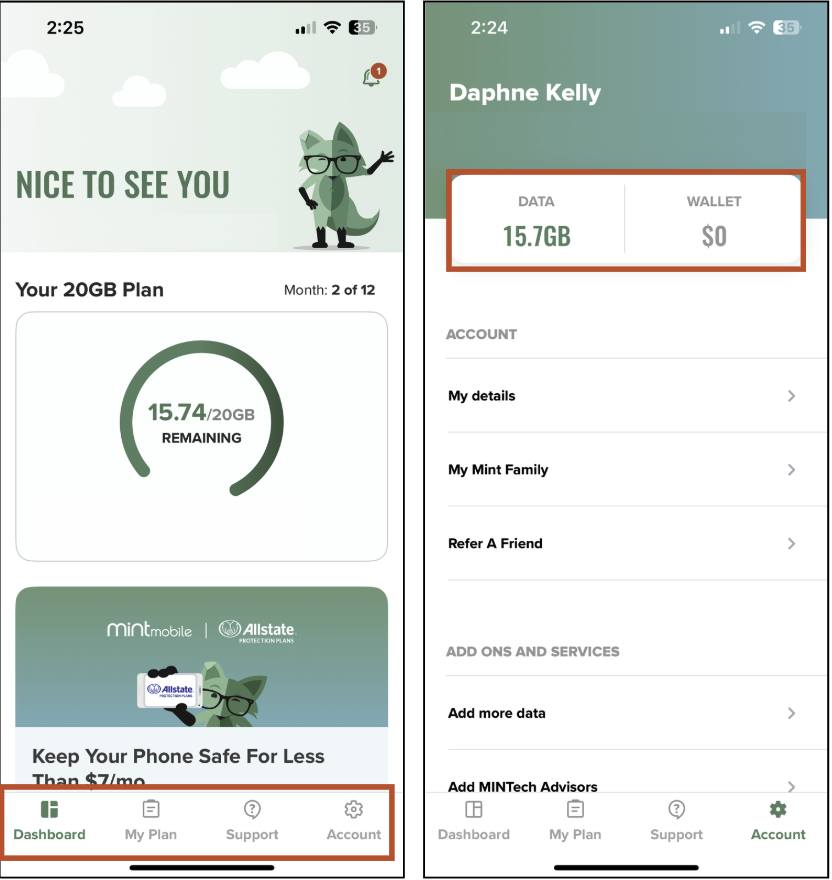
Image: Daphne Kelly | WhistleOut
How to add funds to your Mint Mobile wallet
Add funds to your Mint Mobile wallet by following these steps:
- Log in to the Mint Mobile app.
- After tapping Account, scroll down to Payment.
- Select Add Money to Wallet.
- Choose the amount you’d like to add to your Mint wallet.
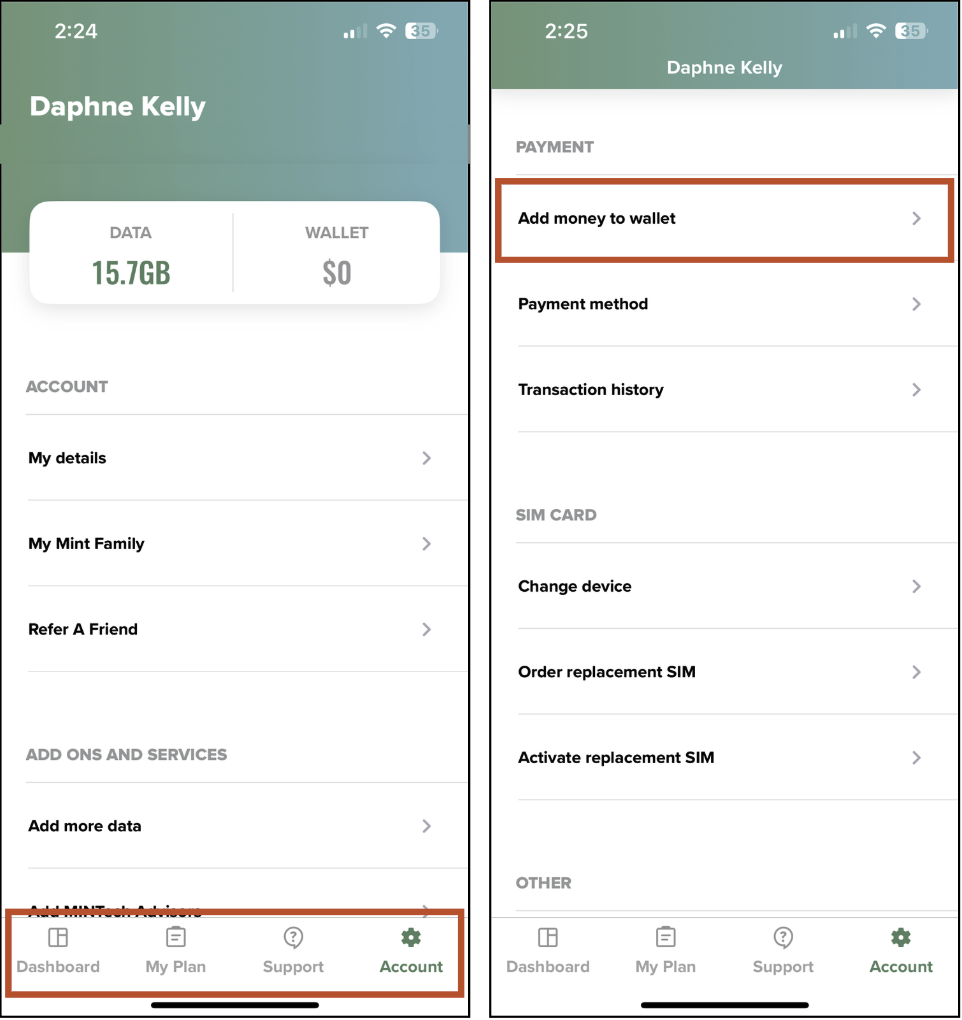
Image: Daphne Kelly | WhistleOut
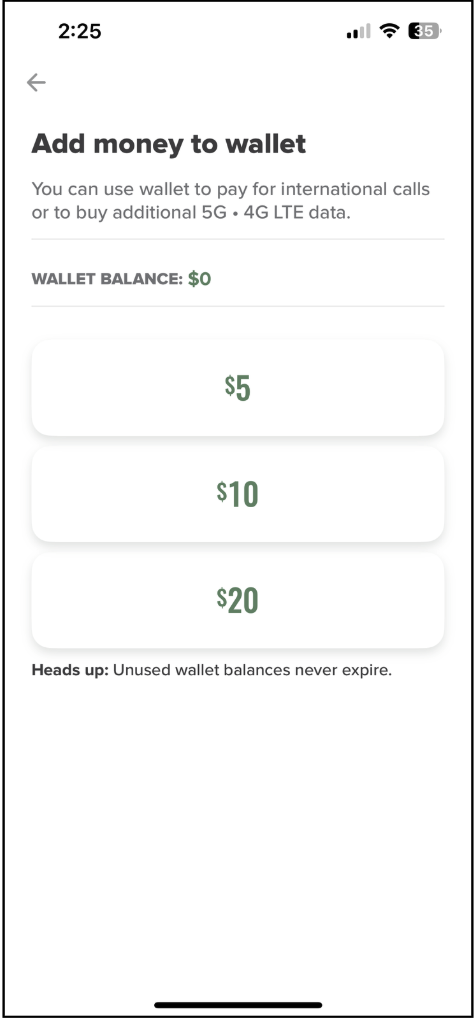
Image: Daphne Kelly | WhistleOut
Mint Mobile wallet: FAQs
What can I use the funds in my Mint wallet for?
You can use the funds in your Mint wallet to pay your monthly phone bill, purchase Minternational Passes for international roaming, add-on extra data, and pay for calling to other countries.
Can I use the balance in my Mint wallet to pay for my plan?
Yes, you can use your Mint wallet balance to recharge your Mint Mobile phone plan. First, you’ll need to turn off autopay, and then go to your Mint wallet to pay for your bill.
How to turn off autopay on your Mint account:
- Open your Account settings.
- Find and tap Payment Method.
- Toggle off Auto Renewal.
Jessica Santero
Staff Writer



.png?w=280&h=280&usm=20&usmrad=0.8&fit=crop "Best Cell Phone Deals for July 2026: Get the New iPhone 17 for Free")



