Whether you’re constantly on the go, working remotely, or nowhere near Wi-Fi, you can use a mobile hotspot to wirelessly access a reliable and secure internet connection. Even though hotspots are usually used for internet access in a pinch, you could realistically replace your home Wi-Fi with a Verizon mobile hotspot and eliminate your internet bill altogether.
However, even though you can replace your home internet with hotspot data, the question remains, should you? If you dare to downsize on bills and use a mobile hotspot instead of home internet, make sure you have enough high-speed data to cover your internet needs for the month.
The bottom line
You most certainly can replace your home internet with a Verizon mobile hotspot, but be wary of how much data you use. Your phone plan’s hotspot probably won’t be enough if you work from home or need to connect multiple devices to your mobile hotspot simultaneously. For that, you’ll want a data-only or dedicated hotspot plan for up to 150GB of monthly data.
What is a Verizon mobile hotspot?
A Verizon mobile hotspot allows you to connect other devices to your phone’s data plan via Wi-Fi. Essentially, using a mobile hotspot creates an internet access point on Verizon’s network to get internet anywhere you get cell service. You can access your Verizon mobile hotspot in two ways: through your smartphone or through a portable hotspot device.
- Turning on your phone’s personal hotspot basically converts your smartphone into a router, allowing other devices to access your Verizon mobile signal.
- If you don’t want to risk draining your phone’s battery, you can opt for a pocket-sized portable mobile hotspot device (or puck for short) to act as your access point. A dedicated mobile hotspot device connects to more devices than your smartphone can—making it more convenient if you need to send and receive data across multiple devices.
Verizon provides a range of hotspot data with each of their unlimited phone plans, but if you want to eliminate your internet bill and depend solely on hotspot data, you might want to boost your monthly data cap with a Verizon data-only plan or a specific hotspot plan.
Does Verizon offer an unlimited hotspot data option?
Verizon has unlimited hotspot plans that are available with both its 4G LTE and 5G networks. Plus, its unlimited mobile plans technically provide unlimited hotspot data, too—just not unlimited high-speed data. Once you surpass your hotspot data limit for the month, your data speeds will slow down to 600Kbps for the remainder of your billing cycle. That’s just barely fast enough to stream a YouTube video at a low resolution.
Verizon hotspot plans and prices
Verizon offers three options for hotspot data:
- Use the hotspot data included in your Verizon unlimited phone plan.
- Pay for a standalone hotspot data plan.
- Pay for a data-only plan.
Verizon offers unlimited and prepaid phone plans ranging in price and hotspot data allowance. When looking at the hotspot allowance for each unlimited plan, it’s important to note that the limit is per line.
Verizon unlimited phone plans: Hotspot allowances
| Plan | Hotspot allowance | Price | Learn more |
|---|---|---|---|
| Unlimited Welcome | N/A | $55/mo | View Plan |
| Unlimited Plus | 30GB | $70/mo | View Plan |
| Unlimited Ultimate | 60GB | $85/mo | View Plan |
| Unlimited Prepaid | 5GB | $50/mo | View Plan |
| Unlimited Plus Prepaid | 25GB | $60/mo | View Plan |
The hotspot allowances on Verizon’s unlimited phone plans won’t be enough to use for your home internet. Luckily, you can boost your plan with up to 150GB/month more through Verizon’s dedicated hotspot plans.
Verizon caters to all budgets and data needs with four standalone hotspot plans. If you plan on connecting multiple devices to use simultaneously or working from home, 150GB/month with the Premium plan is your best bet. All of Verizon’s hotspot plans promise premium data and (with the exception of the Essential plan) up to 4K UHD streaming when connected to 5G.
If you decide on a dedicated hotspot plan you’ll need to purchase a portable hotspot device along with the plan. These pocket-sized devices can range in price from under $100 to upwards of $400, or through a monthly installment plan with Verizon.
Standalone Verizon hotspot plans
Verizon offers a $20/month discount on your standalone hotspot plan if you also have a Verizon unlimited phone plan. But there’s the catch: Only the Unlimited Plus or Unlimited Ultimate plans qualify.
If you want to stop paying for home internet, you could realistically combine the Unlimited Plus phone plan for $80/month with the Pro hotspot data plan for an additional $40/month, making your monthly bill $130 for a total of 130GB of hotspot data. While that may seem pricey, remember—that’s what you’d pay for both your cell phone and internet combined.
Verizon also offers data-only plans. Most often, people use data-only plans for connected devices like tablets and watches, but you can also add a data-only line to your phone plan and use an extra phone as a full-time Wi-Fi hotspot.
Although the data-only pricing is more expensive than hotspot data plans, Verizon’s multi-line discount is worth it if you’re considering adding an additional line. You get $30/month off every additional line of data-only service. That means your first line of a 100GB data-only plan is $80/month, and an additional line is $50/month. You don’t need a specific phone plan to snag this discount, making it perfect for extra hotspot data for multiple people.
Verizon Data-Only plans
| Data-Only plan | Streaming | Price | Learn more |
|---|---|---|---|
| 5GB |
✓HD streaming | $40/month Additional lines at $10/month |
View plan |
| 25GB |
✓HD streaming | $60/month Additional lines at $30/month |
View plan |
| 100GB |
✓4K UHD streaming
✓HD streaming |
$80/month Additional lines at $50/month |
View plan |
| 150GB |
✓4K UHD streaming
✓HD streaming |
$100/month Additional lines at $70/month |
View plan |
Verizon hotspot speeds
Verizon offers one of the fastest wireless networks, and its hotspot data can take full advantage of it. If you live in an area with 5G coverage, you can get hotspot speeds up to 1Gbps. For the rest of the country, Verizon hotspot speeds consistently reach around 60Mbps on its 4G LTE network, which means you can easily stream, game, and browse with your hotspot internet connection.
For the standalone hotspot data options, you’ll need to choose at least the $40 Plus plan to get 5G Ultra-wideband access. The Essentials hotspot plan only gets you 4G speeds, which works fine for checking emails, browsing the internet, and streaming in standard definition, but lacks the speed of the higher tiers.
Data limits
Choosing the right data limit is crucial to making sure you don’t run out before the month is over. Verizon’s unlimited phone plans offer hotspot allowances up to 60GB/month with their top-tier plan, and you can add up to 150GB more with a dedicated hotspot plan or data-only plan. The data limit for each plan (including phone, data-only, or standalone hotspot) refers to premium or high-speed data. Once you reach your limit, your hotspot will still work, but at dramatically lower speeds. You’ll be limited to 600Kbps, which is barely fast enough to stream music and low-quality videos, likely with a lot of buffering. Remember to use your high-speed hotspot data wisely, especially if you plan to rely on a hotspot connection as your main internet source.
If you just need a little extra data to connect your tablet or kindle on the go, an unlimited phone plan is just right. However, to be home internet independent, you’re likely going to need much more data than a phone plan could conjure. For light data users, a hotspot can be an excellent option especially if you do most of your internet-based activities outside of home—say, on a work computer. Heavy data users need a dedicated hotspot plan with 150GB/month to handle data-consuming tasks, like streaming on zoom calls and working remotely.
Can I game on Verizon’s hotspot data?hotspot data option?
If you have a hotspot device capable of 5G speeds, then you can enjoy hotspot speeds up to 1Gbps. At that data speed, you can easily stream in 4K, game online, and browse social media to your heart’s content.
But be warned, Verizon unlimited hotspots have fast speeds up until you run out of high-speed data. After you run out, your hotspot speeds will throttle to 600kbps, which will make you look like a noob when you load into your next Fortnite lobby.
Can I use a Verizon hotspot for my internet?
You can use Verizon hotspot for your internet if you want to stop paying a separate bill, but make sure it suits your lifestyle. Consider your data needs so you don’t end up out of data before the month ends.
A mobile hotspot can be an excellent option for light data users, especially if you do most of your internet-based activities outside of the home—say, on a work computer in an office. If you plan on working remotely or consistently gaming, however, you’ll need a hefty amount of data, more than an unlimited phone plan can supply. In those cases, a standalone plan or a data-only plan can more likely cover your internet needs.
See how much data you use: Before making the switch, check your current internet bill. See how much data your household uses on average. For example, I live in a household with two people, and I work remotely full-time. I often stream music while I work. In the evening, my husband and I often browse on our phones, and we have streaming TV services instead of cable that we typically have on for a few hours. All told, we consume around 300GB of data per month—more than a hotspot would be practical for.
Save on your Verizon Hotspot plan by bundling 4 lines
The more the merrier at Verizon since plans are cheaper with each additional line you have on your plan. For example, 4 lines on unlimited plus is $180/month or $45/month per line, but a single line plan on unlimited plus is $80/month. Also, If you bundle multiple lines, you can mix and match different plan types on one account, including data-only and hotspot plans.
Check out our guide to Verizon’s family plans for more details about line bundling.
Pros and cons of using a hotspot for home internet
Pros:
- Internet on the go
- Nationwide coverage
- Great quality for the price
Cons:
- Expensive hotspot devices
- Pricey data plans
- Occasional slow speeds
Mobile hotspots are great for remote workers. If you work on the go frequently or find yourself working away from home, you would benefit from a Verizon mobile hotspot. Connect from anywhere, anytime without having to worry about connecting while out of your home office.
Switching to a hotspot for home internet lets you connect almost anywhere. Internet options are limited in rural areas of the United States, but cell coverage is vast. Verizon’s coverage map, including 5G, is extensive, reaching both rural towns and urban cities. You can use a mobile hotspot to avoid suffering slow internet thanks to Verizon’s nationwide network.
A mobile hotspot is cheaper and faster than satellite internet. While opting to solely use a mobile hotspot is slightly more expensive than home internet, it’s still cheaper and offers better quality than a satellite internet plan. However, you may experience some speed variation on Verizon’s cellular network.
Data plans are expensive. Standalone hotspot data plans or data-only plans are usually expensive because of limited network capacity. However, you get what you pay for. A hotspot for home internet allows you to take your internet with you, wherever you go.
To use a dedicated mobile hotspot, you’ll need to buy a portable hotspot device—and the options are limited. The market for portable hotspot devices is scarce, meaning you have to work with what’s available (and many of them come locked to specific carriers).
Beware slow speeds. Depending on which Verizon hotspot package you choose combined with your location, you may face slower speeds due to deprioritization or throttling as compared to fiber or cable internet.
Verizon hotspot devices
All of Verizon’s standalone hotspot plans require a portable hotspot device (puck), basically the key for your Wi-Fi portal. You can then connect multiple devices to your puck for easy internet access. With Verizon’s plans, you can bring your own puck, or purchase one from the carrier.
The Inseego Mifi X Pro connects to your Verizon data plan and broadcasts a Wi-Fi signal wherever you roam. Unlike your phone, which only allows you to connect two devices at a time, the Inseego connects up to 15 devices simultaneously (and saves your phone battery).
When choosing a portable hotspot device, make sure it’s compatible with your carrier. Or, you can choose to purchase this hotspot device directly through Verizon for 36 monthly installments of $9.72/month (totalling $350). That said, since Verizon does allow you to bring your own puck, you can snag the same Verizon-compatible Inseego Mifi X Pro on Amazon for about $100 cheaper.
A standalone hotspot device makes a lot of sense for multi-person, multi-device households. You can connect your laptop, smart TV, tablet, and many more devices simultaneously. If you spend a considerable amount of time traveling, you can easily take all of your devices and connect them to your portable hotspot without draining your phone’s battery. Thankfully, Verizon offers the strongest wireless coverage, so you can expect coverage basically anywhere in the country.
Are you in a Verizon 5G area?
Customers that have access to Verizon's Ultra Wideband network may be able to take advantage of the company's new 5G Home Internet plan. Instead of coming up against dedicated hotspot limits, you'll have unlimited data on the fastest 5G network in the country... and it can connect your entire home via Wi-Fi with a 5G modem and router.
Verizon 5G Home Internet vs. Verizon mobile hotspot
Your priorities are key when deciding between Verizon 5G Home Internet or a Verizon mobile hotspot. Both Verizon 5G Home Internet and a Verizon mobile hotspot work similarly. Rather than connecting to a fiber or DSL network via a cable routed to your home, both options connect directly to Verizon's 5G cellular network. Verizon Home Internet uses a router, while Verizon mobile hotspot uses a portable hotspot device.
|
Verizon

5G Home
$50/mo
with AutoPay
|
If you have data-heavy habits like high-definition streaming and gaming, chances are a mobile hotspot household might be a challenge. However, if you champion flexibility in location or are fed up with limited internet options in your area, then a mobile hotspot gives you a viable option.
It’s essential to know how much data each app or online activity uses so you can decide whether it makes sense for you to replace your home Wi-Fi with a Verizon mobile hotspot. Any connected device that requires internet access will eat up your hotspot data. Here’s an estimated breakdown of how much data everyday internet activities require.
| Data per hour | Risk | Suggested plan | |
| Online gaming | From 3MB | At least 1GB | |
| Podcasts | Approx. 60MB | At least 2GB | |
| Web browsing | Approx. 60MB | At least 2GB | |
| FaceTime | Approx. 85MB | At least 3GB | |
| Approx. 80MB | At least 3GB | ||
| Music streaming | Up to 150MB | At least 5GB | |
| Snapchat | Approx. 160MB | At least 5GB | |
| Facebook video | Approx. 160MB | At least 5GB | |
| YouTube | Approx. 300MB | Unlimited | |
| Netflix | From 250MB | Unlimited | |
| Lossless music streaming (Tidal) | Approx. 640MB | Unlimited | |
| Approx. 720MB | Unlimited | ||
| TikTok | Approx. 840MB | Unlimited |
If you like to stream videos in 4K, you could burn through your entire hotspot data allotment in just a few hours, or you could stream over 100 hours of music and SD-quality videos. However, if you can avoid high-data activities, like 4K streaming, it’s possible you can replace your home Wi-Fi connection with a hotspot.
Get Verizon coverage for half the price
You can save even more on your monthly bills without leaving Verizon’s network. Visible, a Verizon-owned and operated MVNO, gets you a $5–$10/month discount on Verizon 5G Home, LTE Home, or Fios internet with a phone plan that’s a fraction of the cost.
Choose between Visible’s $25/month, $35/month, $45/month plans and only pay between $35–60/month for Verizon 5G Home internet. You’ll keep Verizon’s excellent coverage and enjoy an unlimited phone plan plus home internet for under $100/month.
You can check out why Visible is our favorite Verizon MVNO in our hands-on Visible review.
Verizon hotspot FAQs
How do I check my Verizon personal hotspot usage?
You can check your Verizon personal hotspot usage directly on your phone.
On an iPhone:
- Open Settings.
- Tap Cellular or Mobile Data.
- Tap Personal Hotspot.
- Check out your usage totals under personal hotspot.
On an Android device:
- Open your Settings app.
- Tap Mobile hotspot & tethering.
- Tap Mobile hotspot and then Mobile hotspot shared today.
Is the Verizon unlimited hotspot actually unlimited?
No, Verizon’s hotspot plans aren’t actually unlimited. The hotspot limit for each plan refers to high-speed data. Once you reach your limit, your speeds will drop to 3Mbps on 5G Ultra Wideband or 600Kbps on 5G/4G LTE.
Can I get a Verizon hotspot without a Verizon phone plan?
Yes, you can get Verizon hotspot data without a Verizon phone plan if you purchase a dedicated hotspot plan for a portable hotspot device. Check out the different plans and prices for mobile hotspot plans and data-only plans.
How do I connect and turn on my Verizon hotspot?
To turn on mobile hotspot on your iPhone:
- Open your Settings app and tap Personal Hotspot.

- Toggle on Allow Others to Join to turn on your hotspot.
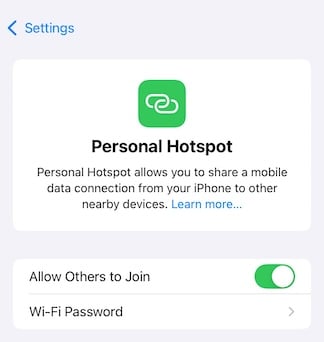
- (optional): Set a password or use the default password Apple gives you.
To turn on your hotspot on an Android phone:
- Open the Settings app and select the Network and Internet menu.

- Tap Hotspot & tethering.

- Under Wi-Fi hotspot, toggle Bluetooth tethering to On.

- Tap Wi-Fi hotspot to confirm the network name and set a password before toggling your hotspot to On.

Note that, depending on which Android device you use, the steps for turning on your hotspot might vary slightly. They should generally follow a similar path as above.
If you’re using a mobile hotspot device, like the Verizon Jetpack or Inseego Mifi X Pro, turn it on with these steps:
- Insert the included SIM card and battery into your mobile hotspot device.
- Press and hold down the Power button until you see the display turn on.
- Wait for the device to activate automatically. The LED indicator light will turn green when it’s ready to provide a data connection.
Lauren Hannula
Managing Editor

Find a better internet plan
Enter your address to find the best internet providers available in your area.

Related Articles


Related Topics
InternetPopular Topics
Internet Spectrum Internet Xfinity Research and Reports AT&T T-Mobile News Verizon App Explainers MINTernetInternet Providers by State
- Internet in Alabama
- Internet in Alaska
- Internet in Arizona
- Internet in Arkansas
- Internet in California
- Internet in Colorado
- Internet in Connecticut
- Internet in Delaware
- Internet in District of Columbia
- Internet in Florida
- Internet in Georgia
- Internet in Hawaii
- Internet in Idaho
- Internet in Illinois
- Internet in Indiana
- Internet in Iowa
- Internet in Kansas
- Internet in Kentucky
- Internet in Louisiana
- Internet in Maine
- Internet in Maryland
- Internet in Massachusetts
- Internet in Michigan
- Internet in Minnesota
- Internet in Mississippi
- Internet in Missouri
- Internet in Montana
- Internet in Nebraska
- Internet in Nevada
- Internet in New Hampshire
- Internet in New Jersey
- Internet in New Mexico
- Internet in New York
- Internet in North Carolina
- Internet in North Dakota
- Internet in Ohio
- Internet in Oklahoma
- Internet in Oregon
- Internet in Pennsylvania
- Internet in Rhode Island
- Internet in South Carolina
- Internet in South Dakota
- Internet in Tennessee
- Internet in Texas
- Internet in Utah
- Internet in Vermont
- Internet in Virginia
- Internet in Washington
- Internet in West Virginia
- Internet in Wisconsin
- Internet in Wyoming