

Screen recording on your iPhone is one of those things that sounds hard, but in reality, it only takes seconds to set up. Trust me when I say that screen recording is sometimes the only way to help someone figure out something on their phone remotely. Take the time to figure out screen recording with this guide, and you can easily save and share your on-screen activities.
Make sure you’re running the latest iOS on your iPhone, iPad, or iPod Touch
The steps for screen recording require the latest iOS version. As long as you have iOS 14 or later, you can count on the screen recording process following the guide below.
How to Record Your Screen on an iPhone
Just follow these simple steps to start recording your screen on your iPhone, iPad, or iPod touch:
- Open the control center by swiping your finger down on the top-left corner of your screen.
- Tap the circle recording icon that appears in your Control Center. A 3-second timer will start, and once that timer finishes, your screen recording will begin.
- Open the Control Center again, or tap on the Dynamic Island, and tap the red record button to end the recording.
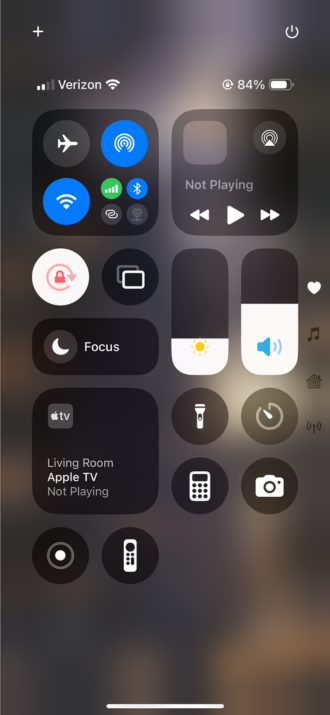
Credit: Angelo Ilumba
Can you record a video playing on your phone?
Yes. While screen recording, you can open your YouTube app and stream a video, or you can play any other video saved on your device. The internal audio from the video will also be recorded in the process. You can screen record a video from YouTube, Quicktime Player, or Facebook and retain both the video and internal audio.
Where to find your screen recordings
Now that you’ve ended your screen recording, you can find the video saved in your Photos library. Like any other video you record, you can watch it, share it, or edit it from your Photos app.
iPhones that Support Screen Recording
All iPhones and iOS devices that can run iOS 11 and later can screen record.
For those of you with an older iOS device, here are the older devices that can still support iOS 11 and screen recording.
Older iOS devices that support screen recording
| iPhone | iPad | iPad Touch |
|---|---|---|
|
|
|
Best Deals on iPhone 16
If your phone feels a little dated, or you just want to upgrade, or even if you want to upgrade your iPhone 14, here are the best deals for the iPhone 16 available now:
|
XFINITY Mobile

Mobile Select Plan
$0.00/mo
(for the first year of service) <br>Regular rate of $30/mo. thereafter
+ $729.99 Upfront
|
|
Boost Mobile

Unlimited Plan
$10.00/mo
with AutoPay
+ $729.99 Upfront
|
|
PureTalk

Unlimited Data w/ 2GB Hotspot Plan
$15.00/mo
+ $729 Upfront
|
|
Tello

Unlimited Text, Talk, and Data Plan
$25.00/mo
+ $649 Upfront
|
|
Red Pocket

Premium Monthly Plan (CDMA)
$30.00/mo
+ $729 Upfront
|
|
Spectrum Mobile

Unlimited Data
$30.00/mo
+ $749.99 Upfront
|
Tyler Abbott
Contributing Writer

Find a better phone plan
Thousands of cell phone plans unpacked. All the facts. No surprises.


.png?w=280&h=280&usm=20&usmrad=0.8&fit=crop "Best Cell Phone Deals for July 2026: Get the New iPhone 17 for Free")



