
Crash Detection uses your iPhone's sensors to identify severe car crashes and automatically calls emergency services if you're unresponsive. It works on iPhone 14 and later, and it's turned on by default, so most iPhone owners already have it without realizing it.
The feature is part of Apple's broader push into automatic iPhone safety features that are designed to provide lifesaving help.
What is iPhone Crash Detection?
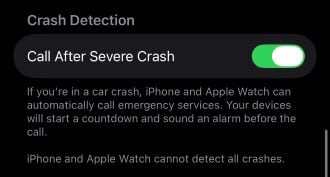
Image: Max McCaskill
Crash Detection is a feature that uses your iPhone's accelerometer, gyroscope, barometer, GPS, and microphone to recognize the physical signs of a severe car crash. It's built to catch front-impact, side-impact, and rear-end collisions, along with rollovers, in cars, SUVs, minivans, and pickup trucks.
Apple trained the system using over a million hours of real-world crash and driving data, which is what allows it to tell the difference between a real collision and something like slamming on the brakes.
Which iPhones have Crash Detection?
Crash Detection is available with a current version of iOS on the following iPhone models:
- iPhone 14 series
- iPhone 15 series
- iPhone 16 series
- iPhone 17 series
- iPhone Air
Which Apple Watches have Crash Detection?
If you don't have a compatible iPhone, some Apple Watch models also have Crash Detection. A compatible Apple Watch detects crashes using its own sensors, so it can complete the emergency call using its own cellular or Wi-Fi connection, or route through the paired iPhone if needed.
Crash Detection is available on these Apple Watch models:
- Apple Watch Series 8 and later
- Apple Watch SE (2nd generation) and later
- Apple Watch Ultra
What happens when Crash Detection is triggered
When a severe crash is detected, your iPhone or Apple Watch follows a specific sequence:
- Your device sounds an alarm and displays an alert for 10 seconds. On Apple Watch, it also chimes and taps your wrist.
- If you don't respond, it starts a 30-second countdown, with loud alerts, vibration, and flashing lights to get your attention.
- If you still don't respond, your device automatically calls emergency services and plays a recorded message explaining that a severe crash was detected.
- If you've added emergency contacts, they receive a message with your location.
- If you've set up your Medical ID, responders can access it directly from the alert.
If you have both an iPhone and a paired Apple Watch, the alert and Emergency Call slider appears on your watch, and the call is made from there.
Your location is shared with emergency services regardless of whether Location Services is turned on.
Does iPhone Crash Detection actually work?
Yes, Crash Detection has been credited with connecting real crash victims to emergency responders, including cases where the person was unconscious and unable to call for help themselves. That said, it can sometimes go off when you haven't been in a crash.
Activities with sudden stops or hard impacts—like skiing, roller coasters, or off-roading—have triggered false alarms. Apple designed the cancellation window specifically so you can dismiss these false alarms before emergency services are contacted.
Crash Detection is a lifesaving iPhone safety feature. We recommend leaving it on even if you're about to do an activity that risks unintentionally setting it off.
Max McCaskill
Sr. Staff Writer

Find a better phone plan
Thousands of cell phone plans unpacked. All the facts. No surprises.


.png?w=280&h=280&usm=20&usmrad=0.8&fit=crop "Best Cell Phone Deals for July 2026: Get the New iPhone 17 for Free")




