
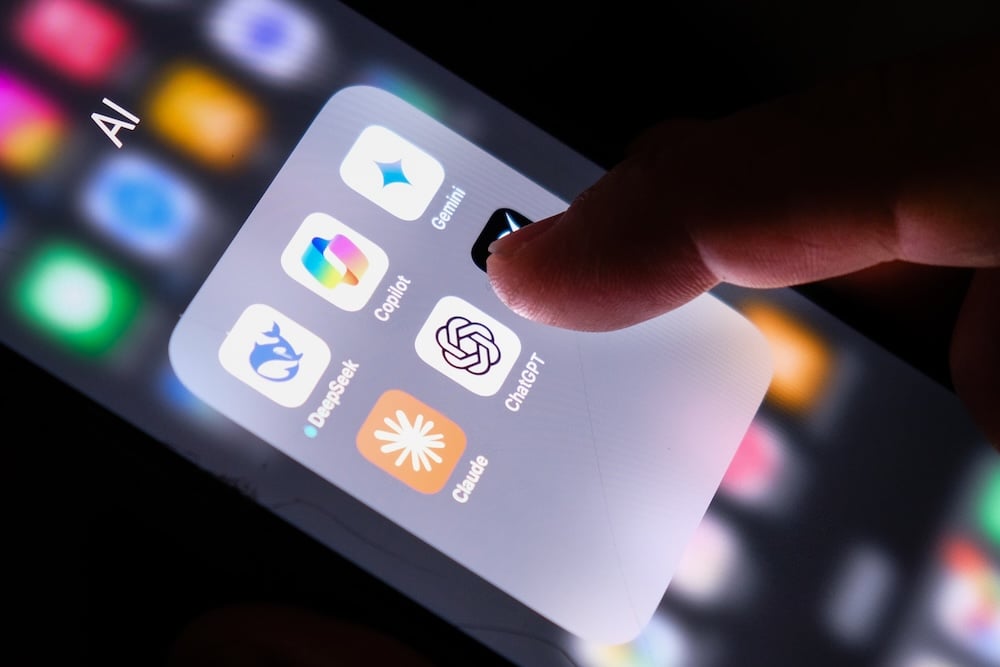
You don't need a fancy new smartphone to access the best AI tools. Incredibly powerful AI apps are already available for the phone in your pocket right now—and most are completely free. This means you aren't missing out on powerful features if you don't have Apple Intelligence or Samsung's Galaxy AI. In fact, these standalone apps offer even more specialized and advanced capabilities.
I spent the last month testing the best AI apps that deliver genuine utility without a costly phone upgrade. Of the 14 apps I downloaded, 10 stood out as either making my life easier or offering a creative venue, including enhancing my photos with Remini, creating custom apps with Softr, or even just chatting with a unique AI personality on Character.ai.
Here are the 10 best AI apps for iPhone and Android you can download right now to work smarter, learn faster, and be more creative.
Why you can trust WhistleOut
.svg)
15+
years of mobile industry experience

900+
published wireless guides

35+
firsthand carrier reviews
We've been around since the birth of the iPhone. Along the way, we've learned how to spot the best deals for your wallet (and your sanity). We spend our days researching informative guides and writing insightful reviews on every kind of wireless plan, distinguishing what matters from what doesn't. We played around with these plans before recommending them, ensuring they're worth your hard-earned money.
Want to know more? Check out how we review every cell phone plan we rank.
 How I tested the top AI apps
I spent a full month testing 14 AI apps on both my iPhone 11 and my Samsung Galaxy S24 FE to see how they performed in everyday, professional, and creative tasks. The features and scenarios I tested included the following:
- Asking informational prompts
- Recipe research and generation
- Analyzing my journal entries and daily routines
- Enhancing my class notes
- Listening to narrated PDFs
- Conversing with AI personalities
- Creating a test landing page
- Editing images
After testing, 10 apps stood out as being particularly useful, creative, or just plain fun to play with, which I've outlined below.
The best free AI apps to download now
ChatGPT: The AI app that started it all

Free for iPhone and Android. Premium subscriptions start at $20/month.
ChatGPT is your best starting point for generative AI. It’s the app that made AI technology accessible, and its free version remains incredibly useful for everyday tasks like drafting emails and answering complex questions. I personally like to use ChatGPT as my personal tour guide when I travel, with prompts for walking tours and historical explanations. Better yet, it syncs your conversation history across all of your devices so they're never out of reach.
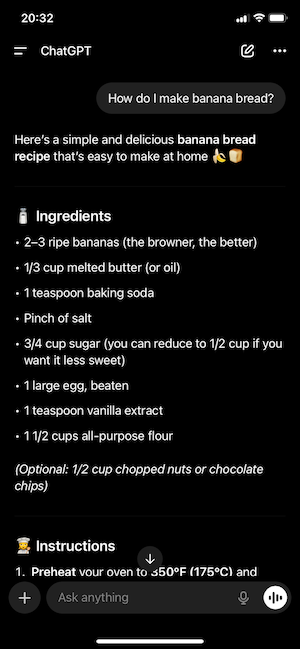
Image: Jessica Santero | WhistleOut
ChatGPT’s free model is worth downloading, but it's not OpenAI's most powerful or fastest version. You get great, general-purpose AI for free. Plus, when compared to other AI apps, ChatGPT includes unlimited searches. But you'll have to pay $20/month for a ChatGPT Plus subscription to access the latest, most advanced AI technology and faster speeds. The free tier is best for casual users, while the paid tier is geared for workers or full-time students.
Stay connected to AI with cheap unlimited data
Your AI tools are only as useful as your connection allows them to be. Fortunately, staying online doesn't require a pricey plan. You can choose from the most popular unlimited data options for under $50/month, giving you the freedom to access powerful AI features wherever you are, without ever watching your data usage.
|
#1
|
Visible

$25 Visible Plan
$25.00/mo
Taxes & Fees included
|
|
#2
|
Mint Mobile

Unlimited Data Plan
$25.00/mo
$75.00 upfront payment for 3 months (equals to $25.00/month). Intro pricing for new customers only.
|
|
#3
|
T-Mobile

Essentials Saver
$50.00/mo
with Auto-Pay - Taxes & Fees NOT included
|
Perplexity: Your AI research assistant with sources included

Available for free on desktop, Android, and iOS. The premium subscription costs $20/month.
Perplexity AI blends an AI chatbot with a search engine to provide answers complete with citations. This makes it incredibly valuable for research, learning, or any task where you need to check the facts. Here’s how it works: You ask a question in a prompt, and it provides a summary answer alongside the sources it used. You can then click the direct links to those webpages or images to see the original information for yourself. You can access your history across all the devices where you have it downloaded.
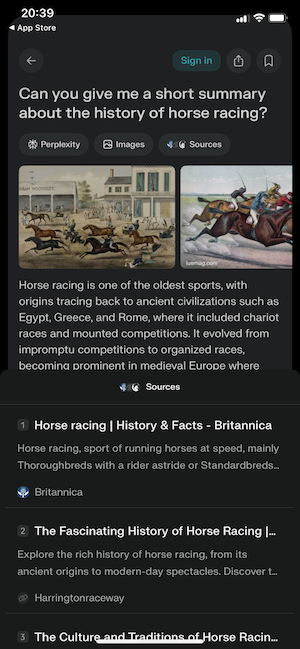
Image: Jessica Santero | WhistleOut
Perplexity's free plan is decent, providing citation-driven search experience (albeit limited) at no cost. The decision to upgrade really hinges on your specific needs. The $20/month Pro plan is designed for demanding users, unlocking more powerful models like GPT-4 and Claude 3.5. You also get unlimited file uploads, and more uses of its advanced Pro Search. For most people, the free version is more than enough. But professionals and avid learners who need the most advanced capabilities will find the Pro tier's expanded toolset worth the expense.
AI journaling apps for smarter self-reflection
Day One: Mix text and media for a larger-than-life journal

Available for free on both iOS and Android. The premium subscription costs just $2.92/month.
Day One is a beautifully designed digital journal built for preserving your best moments. It works like a digital bullet journal that integrates seamlessly with your phone's features. Go beyond text by easily adding photos, recording voice memos, and automatically logging locations, making each entry a detailed and vivid snapshot of your life. Day One even lets you browse all your media in a unified timeline, creating a visual gallery of your best moments. Choose from guided prompts for gratitude, reflection, creativity, and so much more. Day One can help you get started with daily journaling.
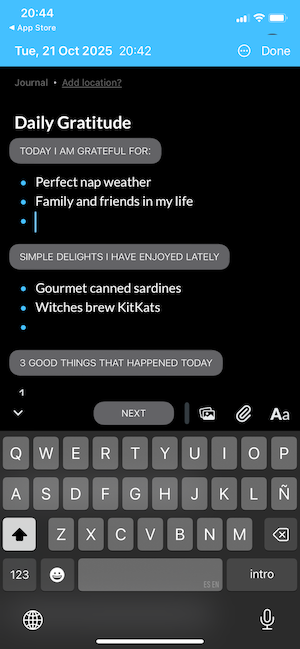
Image: Jessica Santero | WhistleOut
The free version of Day One is fairly basic and has limits on entries, image uploads, and certain features like geotagging. I tested the free version and was impressed with its easy-to-use interface and different cataloguing tabs. The image timeline was unique, lining up my memories in a dated slideshow. The Premium plan costs $34.99/year and includes audio recordings, unlimited photo and video attachments, and seamless sharing across devices.
Foldable phones are the new digital journals
The classic pen-and-paper journal is getting a high-tech upgrade. Foldable phones, with their expansive, book-like screens, have become the new digital Moleskine. They transform journaling from a simple notetaking task into an immersive experience.
If you're ready to elevate your journaling, check out some of the most popular foldable phones on the market now.
Pixel 10 Pro Fold 256GB
- 8 inch display
- Rear Cameras: 48MP, 10.5MP, 10.8MP
- Front Cameras: 10MP, 10MP

Pixel 10 Pro Fold 512GB
- 8 inch display
- Rear Cameras: 48MP, 10.5MP, 10.8MP
- Front Cameras: 10MP, 10MP

Galaxy Z Fold7 5G 512GB
- 8 inch display
- Rear Cameras: 200MP, 10MP, 12MP
- Front Camera: 10MP

Rosebud: AI-guided journaling for emotional wellness

Free trial available for Android and iOS. Subscribe for $12.99/month to continue using Rosebud.
Rosebud has an AI therapist built directly into your journal. The app is designed for self-reflection and emotional wellness. It even uses Cognitive Behavioral Therapy to analyze your feelings based on what you enter in.
You can type or speak your thoughts, and the AI will break down your answers to help you spot emotional patterns. I found Rousebud helped me understand the why behind my likes, dislikes, and behaviors. This insight then helps the app set personalized goals to help you identify triggers or highlights in your routines.
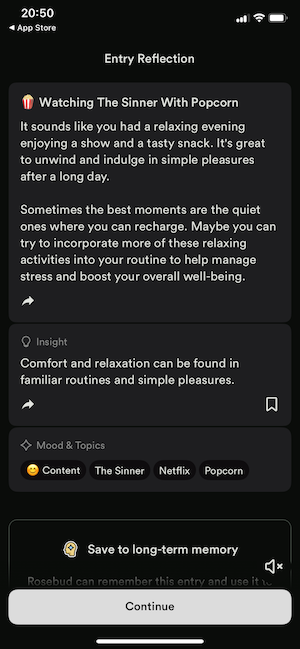
Image: Jessica Santero | WhistleOut
Rosebud’s in-depth analysis can change your lifestyle habits, but it isn’t cheap. Before you commit, try Rosebud with a 7-day free trial, but continued access requires a subscription. Priced at $12.99/month (or $107.99/year), it’s best for serious journalers who enjoy understanding the human psyche.
Best AI productivity apps for students
Notion: Your AI-enhanced system for organizing work and life
Free on iOS, Android, and desktop. The premium subscription costs $10.99/month.
Notion isn’t just a note-taking app, it’s a centralized hub for your work. It combines the functions of word processors, task managers, and spreadsheets into a single, customizable platform. Think of it as notes, but supercharged.
You can set up different planners and create lists, but Notion offers even more with AI integration. Use Notion’s built-in search bar to pull AI-generated answers, or even transcribe lectures and group meetings—directly into your notes. Start by building your workspace using blocks with text, images, to-do lists, or databases. Then you can assemble them like digital LEGOs to create the exact system you need.
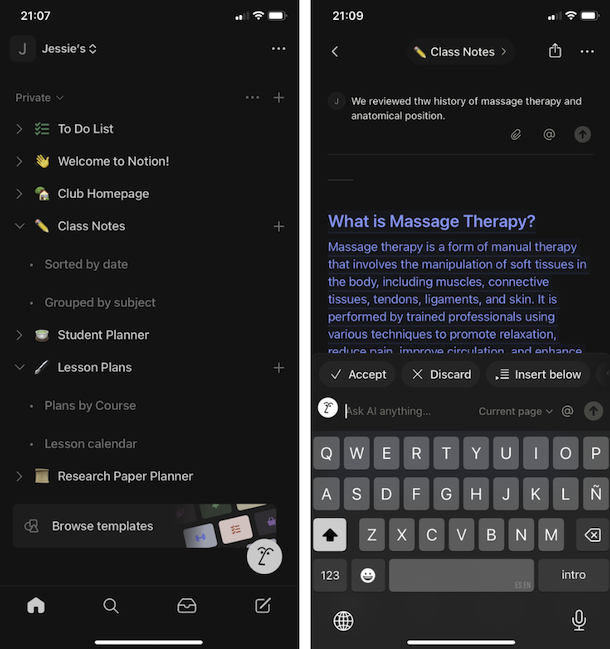
Image: Jessica Santero | WhistleOut
By far the best feature is its built-in assistant, Notion AI. It can summarize long documents, add meeting notes, or help draft new content within your files. It's available across all major platforms, making it accessible to everyone. While Notion’s free version is practical, you’ll have to pay a $10/month subscription if you want AI integration.
Students can save more on unlimited data
With the cost of college tuition alone, students need to save wherever they can—starting with their phone bill. You can cut costs on unlimited data by using student discounts from major carriers like Verizon, T-Mobile, and AT&T, or by choosing an affordable plan from budget carriers like Mint Mobile and Visible.
Check out the top phone plans for students:
|
#1
|
Visible
$25 Visible Plan
$25.00/mo
Taxes & Fees included
|
|
#2
|
Mint Mobile
Unlimited Data Plan
$25.00/mo
$75.00 upfront payment for 3 months (equals to $25.00/month). Intro pricing for new customers only.
|
|
#3
|
T-Mobile
Essentials Saver
$50.00/mo
with Auto-Pay - Taxes & Fees NOT included
|
Evernote: Use AI to search inside your notes, scans, and PDFs
Free for iPhone and Android. Premium subscriptions start at $14.99/month.
Evernote is a cloud storage app that lets you search any file format. From typed notes and news clippings, to PDFs, audio, and scanned documents, Evernote can search information in any file on your phone. It’s even capable of finding text within pictures of handwritten notes or scanned images. The AI Note Cleanup feature can also automatically tidy up poorly formatted notes in case you want to use them in the future.
The main consideration is its pricing. The free plan is very restrictive, so consider upgrading to a paid subscription. You’ll only be able to use Evernote on two devices with a small monthly upload allowance. The $14.99/month Essentials plan includes a larger monthly upload limit, while the full-featured Premium plan costs $17.99/month.
ElevenLabs: Your AI reader for auditory learning and multitasking

Free for iOS and Android. Premium subscriptions start at $5/month.
Turn your dense textbook chapters and lecture notes into personalized audio lectures with ElevnLabs. It’s a top-of-the-line AI voice generator with strikingly natural-sounding speech. You can take any written text and turn it into an audio file. It’s perfect for multitasking students who like to listen on the go. This lets you create a personalized study podcast to listen to while commuting or exercising. It’s primarily a web-based platform, but is also available for both iPhone and Android.
While ElevenLabs does have a free tier, it's best for testing out the technology or converting short texts. Given its monthly character limit, it isn’t ideal for long-term use. For unlimited character-counts and uploads, opt for one of ElevenLabs three subscriptions:
- $5/month Starter plan with instant voice cloning
- $22/month Creator plan with professional quality audio
- $99/month Pro plan for the best audio quality available on the market
Best AI chat app
Character.ai: Chat with anyone, real or imagined

Free for iPhone and Android. Premium costs $9.99/month.
Use character.ai to have conversations with thousands of AI characters, each with their own unique personality. Available for both iPhone and Android users, this app lets you explore or even create your own AI characters with distinct personalities, from historical figures to original creations. You can dive into countless chats to role-play, practice a language, or simply enjoy a character's unique perspective.
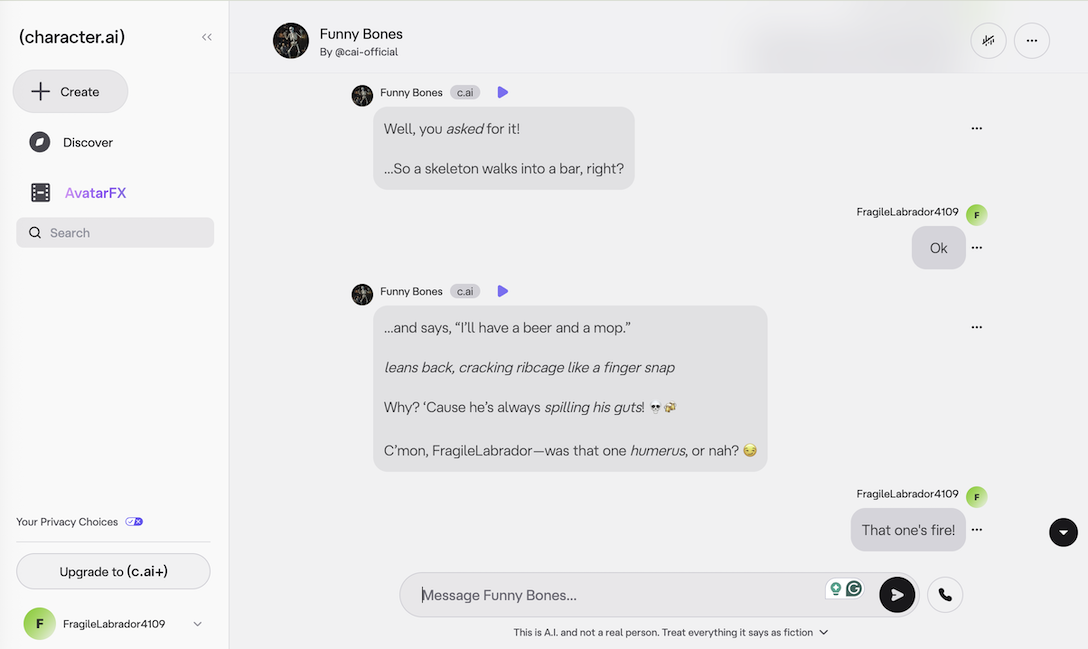
Image: Jessica Santero | WhistleOut
You don’t need a subscription to use Character.ai, making it the best free AI chatbot app for iPhone and Android. You might encounter a waiting room during peak traffic, but it’s worth the wait.
The c.ai+ subscription costs $9.99/month, eliminates wait times, and provides faster responses. If you don’t mind waiting for a popular chat, the free version is ultimately the best option.
Best AI app builders for beginners and non-coders
Softr: Turn your spreadsheets into apps, no coding needed

Only available for desktop.
Softr empowers you to turn a static spreadsheet into a dynamic, no-code web application. It's best for quickly building client portals, internal tools, or member-only websites directly from the data you already have in Airtable or Google Sheets. It's a web-based platform that uses a drag-and-drop interface, and the applications you create are automatically mobile-friendly.
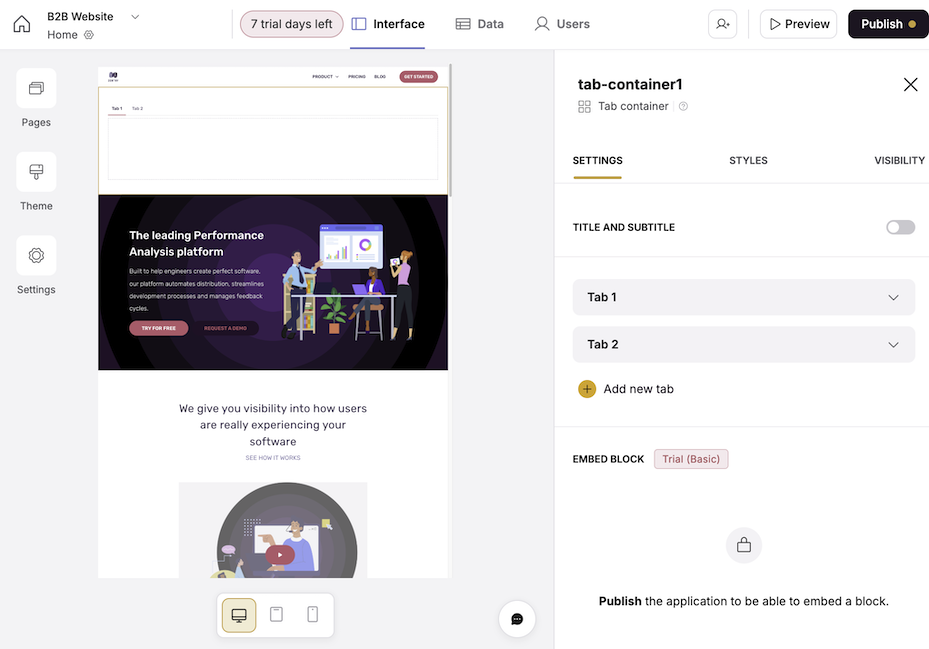
Image: Jessica Santero | WhistleOut
Its AI feature can even create a fully-functioning webpage from a simple prompt. The free plan includes one published app and 500 AI credits, or you can choose a plan subscription for more features starting at $49/month.
Best AI photo apps for better images
Lensa AI: The AI portrait and avatar generator

Free trial on iOS and Android. Subscribe for $7.99/month to continue using the app.
Lensa AI is a specialized tool for AI-powered portraits. Its claim to fame is the Magic Avatars feature that recently took social media by storm. You upload a handful of your selfies, and the AI generates hundreds of artistic portraits of you in various styles. Beyond avatars, it’s a one-tap portrait editor to tune up images or edit the background and foreground separately.

Image: Google Play Store
Unfortunately, Lensa is free to download, but you have to pay to use it. The Magic Avatars are sold in packs, and to unlock the best editing tools, you need a premium subscription starting at $29.99/year. It’s a fun tool, but be prepared to pay to use its most popular features.
Remini: AI for enhancing and restoring photos

Free for iPhone and Android. Premium subscriptions start at $7.99/week.
Remini is an AI photo editor designed to instantly improve your low-quality pictures. It can transform blurry, grainy, or faded photos into clear, sharp images. This is especially useful for restoring the clarity in old family photos or fixing a modern picture that didn't turn out well.
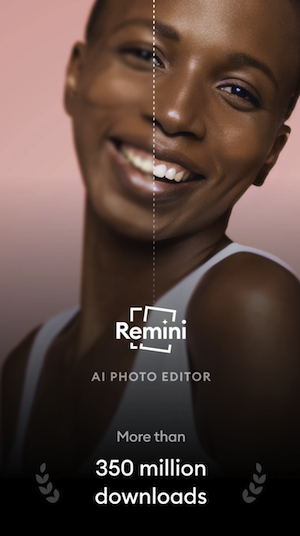
Image: Google Play Store
The app is free to use for basic enhancements on iOS and Android. Each time you process a photo, you'll watch a short video ad. For an ad-free experience, weekly subscriptions are available:
- Remini Lite Weekly for $7.99
- Remini Pro Weekly for $9.99
These paid plans remove all ads and provide faster processing, but make sure you’ll use it frequently enough to justify the cost.
Why you don’t need to upgrade your phone for AI features
My testing is proof that you don’t need a brand-new (and expensive) phone to use powerful artificial intelligence features. I tested these apps with my very old iPhone 11—which I still love—and a Galaxy S24 FE, which is a generation old and also the budget option for the Galaxy line. Sticking with your current phone gives you the freedom to pick the best tools for your needs without being locked into one brand's AI ecosystem, like Apple Intelligence or Galaxy AI.
And even if you are in the market to upgrade, we still recommend first looking at models one to two generations old; the most recent Android and iPhone releases have produced incremental iterations at best, with the most groundbreaking features having been introduced several years ago. With a slightly older phone, you're getting the best parts of each manufacturer's technology at a significantly lower price.
Below are a few of the most popular devices on the market, according to our readers. Check these out, or click through to use our tool to find the right phone that meets your needs and budget.
Moto G 5G (2025) 128GB
- 6.7 inch display
- Rear Cameras: 50MP, 2MP
- Front Camera: 16MP

Galaxy A26 5G
- 6.7 inch display
- Rear Cameras: 50MP, 8MP, 2MP
- Front Camera: 13MP

Pixel 10a 128GB
- 6.3 inch display
- Rear Cameras: 48MP, 13MP
- Front Camera: 13MP

Best AI apps: FAQs
Which is the best AI for iPhone?
The best AI for iPhone depends on personal preference. For versatile tasks like drafting content and answering questions, ChatGPT is the top choice. But Apple Intelligence and Galaxy AI are still great options for integrated AI in your device.
Are AI apps safe to use on iPhone?
Yes, AI apps on iPhone are generally safe, especially if they're from trusted developers like OpenAI. If you aren't sure if an app is safe, check its privacy policy to understand how your data is being used.
Is there a totally free AI app for Android?
Yes, many AI apps for Android are completely free to use. You can use ChatGPT and Perplexity free of charge.
How do I download Apple Intelligence on my iPhone?
To download Apple Intelligence to your iPhone, first update your device to the latest iOS version (18.1 or later), then go to Settings > Apple Intelligence & Siri and turn on the feature. Only the iPhone 15 Pro and later models can use Apple Intelligence.
How do I download Galaxy AI for my Android?
To download Galaxy AI, you need to update your Samsung phone's software to the most recent version.
Jessica Santero
Staff Writer

Find a better phone plan
Thousands of cell phone plans unpacked. All the facts. No surprises.


.png?w=280&h=280&usm=20&usmrad=0.8&fit=crop "Cheap Unlimited Data Plans from $25/Month")


.png?w=280&h=280&usm=20&usmrad=0.8&fit=crop "Best Cell Phone Deals for June 2026: Get the New iPhone 17 for Free")

