
Image: Max McCaskill
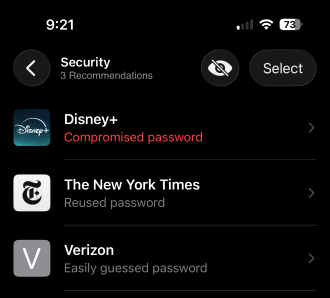
Apple's Passwords app actively monitors your saved credentials against known data breach databases. When it finds a password that's weak, common, or reused, it flags it for you to see and take action.
While these alerts don't mean that someone is currently trying to break into your account, it's always a best practice to act on them as soon as you see them.
Here's what each alert actually means, how Apple checks your passwords without ever seeing them, and what you should do next to keep your account safe.
Quick guide: Decoding your iPhone password alerts
| Password alert | What it means | What to do |
|---|---|---|
| Compromised password | Your password was found in a known data breach database | Change it immediately everywhere you use it |
| Reused password | The same password is used across multiple accounts | Change at least one password so they no longer match |
| Easily guessed password | Your password is weak and predictable | Replace it with something unique and strong |
What each iPhone password alert means
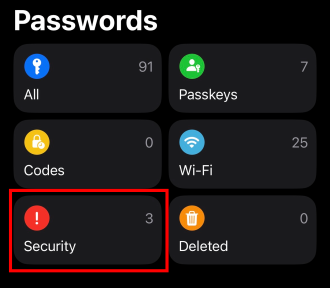
Image: Max McCaskill
You can find current alerts in the security section of your Passwords app.
A password alert doesn't mean your iPhone was breached or someone is breaking into your account. It means Apple has discovered a problem with your credentials. Maybe they appeared in a known data leak, or the Passwords app identified that you're using the same password over and over again.
Compromised password
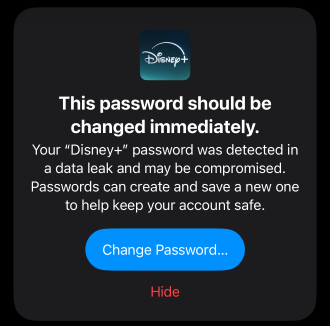
Image: Max McCaskill
This is the most urgent alert. It means your exact password turned up in a known data breach. While it may take time for a bad actor to plug it in at the right place, it's only a matter of time before your account is compromised. Change the password immediately, and change it on every site where you've used it.
Reused password
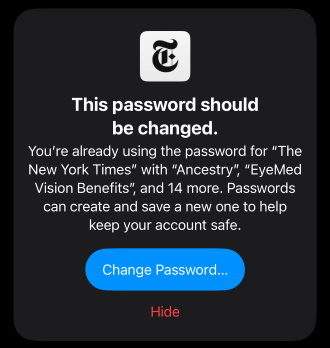
Image: Max McCaskill
This means your password hasn't been breached yet, but you're using the same one across multiple accounts. That's a problem because if one account gets compromised, every account sharing that password is now at risk too. Change the password and come up with a unique option for every account. Remember, you don't have to memorize them. The Password app will fill them in automatically.
Easily guessed password
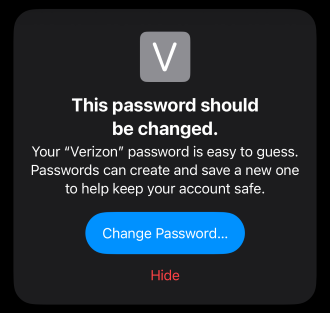
Image: Max McCaskill
This means your password is too simple. Common examples include "123456" or "password." These kinds of passwords are dangerous because they don't even require a data breach, since a bad actor can easily guess them. Replace them with something longer, random, and unique to that account.
How does my iPhone check passwords without Apple seeing them?
Apple constantly compares your passwords against known, leaked credentials from major web breaches. It's the same kind of system that Have I Been Pwned uses to monitor leaks connected to your email account.
Your iPhone does the sensitive work of checking for password breaches locally on your device. Apple's servers are involved in the process, but they never receive your actual password. Instead, they get a scrambled, unreadable version. Your iPhone then compares the results on-device, without sending anything identifiable. Even if Apple itself suffers a data breach, no one will get a readable form of your password.
What to do when you get a compromised password alert
During our recent data privacy survey, WhistleOut learned that 31% of Americans have experienced a data breach. Some people—like me—have even been caught up in several. With over 4,100 data breaches happening in 2025 alone, at some point in the future, there's a good chance you'll see a compromised password alert pop up in your Passwords app.
Here's what to do when you see a compromised password alert on your iPhone:
Step 1: Don't panic. Remember, a compromised password alert means that it's time to take action, not that you're currently being hacked.
Step 2: Identify and prioritize the most important impacted accounts. If you've reused the password in several places, here is the best order to follow:
- Email accounts (often used to reset everything else)
- Banking and financial accounts
- Apple ID and Google account
- Work accounts
- Social media accounts
Step 3: Change the flagged password. Make sure it's something unique and strong. For the best results, consider using the random generator built into the Passwords app. Check out our guide on how to create a strong password if you need help.
Step 4: Don't reuse the new password. Each account should always get its own password. Remember that when you reuse a password, one single data breach can impact many of your accounts.
Step 5: Keep using your password manager. If your password isn't in the Passwords app, you may not learn about the next time it's breached. Apple's password manager is great because it's built into iOS, has cross-platform functionality, and automatically saves new passwords to the iCloud Keychain. ICloud handles that syncing, so your logins follow you to every device signed into your Apple ID. If you want the full rundown on what else it backs up, here's our guide to what iCloud is and how it works. That said, it's not the only option, so check out our other picks for the best password managers.
iPhone password alerts: FAQ
What does "this password has appeared in a data leak" mean on iPhone?
"This password has appeared in a data leak" is an alert from your Passwords app warning you that one of your passwords has been compromised. When data breaches occur, lists of usernames and passwords pop up on the dark web or on databases across the internet. Your iPhone constantly monitors those lists, and if it finds a match with one of your accounts, it sends this alert as a warning.
Does a compromised password mean my iPhone was hacked?
No, a compromised password alert does not mean your iPhone was hacked or that your iPhone's passcode was caught in a data leak. It means that one of your online accounts is in danger of being breached by a password that was publicly leaked on the internet.
Why are all of my passwords showing as compromised at once?
If all of your passwords are showing as compromised at once, you were likely reusing the same password for all your accounts, and one was breached. You'll need to change the password for all impacted accounts. Additionally, make sure to pick unique passwords for each account so a single future breach won't flag every password you have.
Can I check for compromised passwords manually?
Yes. The Passwords app is available on any iPhone running the current iOS, since it was first introduced as an iPhone security feature in iOS 18. Open the Passwords app, tap the Security section, and you can manually review flagged passwords.
What is the Apple Passwords app?
The Passwords app is Apple's dedicated password manager. It holds account passwords, passkeys, security codes, and Wi-Fi passwords. It also has extra features, such as password security monitoring and the ability to share Wi-Fi passwords through a QR code.
Should I turn off compromised password detection?
No, compromised password detection is private, passive, and genuinely useful for warning you about potential breaches. Turning it off doesn't make your passwords safer. It just means you won't know when they're in danger. The only time you should consider disabling it is if you're using another password manager that already handles breach monitoring and you find the Apple alerts redundant.
Max McCaskill
Sr. Staff Writer

Find a better phone plan
Thousands of cell phone plans unpacked. All the facts. No surprises.


.png?w=280&h=280&usm=20&usmrad=0.8&fit=crop "Best Cell Phone Deals for July 2026: Get the New iPhone 17 for Free")



