
FlightAware was tracking flights before most people knew flight tracking apps existed. It's the original, and that legacy is visible the moment you open it. FlightAware's interface looks like something you'd have open next to a game of "Where in the World is Carmen Sandiego?" and the map updates every 30 seconds rather than moving in real time.
That said, writing off FlightAware entirely would be too hasty. I tested it as part of WhistleOut's roundup of the best flight tracking apps, and there are still situations where it earns a spot on your phone.
Free for iOS and Android.
Premium subscription available.
What is FlightAware?
FlightAware is a flight tracking app available on iOS and Android that provides flight status updates, airport delay data, and flight path history.
It's been around longer than most of its competitors and was a go-to for frequent flyers before newer apps like Flighty and Flightradar24 raised the bar on what real-time tracking could look like.
On Verizon and wondering if you're overpaying?
MVNOs run on Verizon's network and often cost significantly less per month. Compare the top Verizon MVNO plans below and see what you could keep in your pocket before your next trip.
|
Visible

$25 Visible Plan
$25.00/mo
Taxes & Fees included
|
|
XFINITY Mobile

Mobile Select Plan
$0.00/mo
(for the first year of service) <br>Regular rate of $30/mo. thereafter
|
|
US Mobile

Unlimited Premium Plan
$39.00/mo
|
An oldie, but a goodie
Opening FlightAware after spending time in Flightradar24 is a bit of a jolt. The plane icons on the map don't move; they jump from one position to the next in 30-second intervals. It's functional, but compared to the smooth real-time movement you get in other apps, it feels static and dated.
The Misery Map, which shows delay percentages across U.S. airports, is a smart concept but isn't particularly easy to navigate. You can see which airports are struggling and why (weather, volume, or equipment issues), but getting that information out of the app requires more effort than it should.
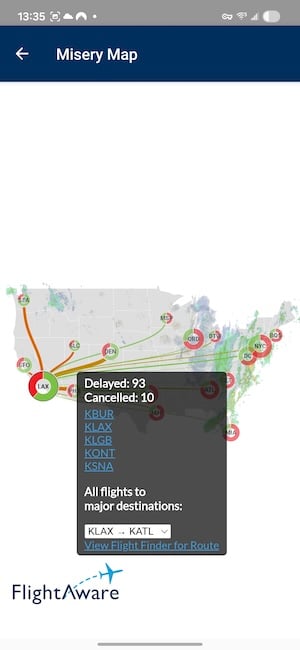
Image: Jessica Santero | WhistleOut
FlightAware is still a decent app
The two areas where FlightAware holds its ground are flight path history and system-wide U.S. airport delay data. If you want to know the historical route of a specific flight (like what path it usually takes, how often it runs late, what its track record looks like), FlightAware goes deeper and shows you more information than most alternatives.
You can add your flight number and receive status alerts, and the delay cause (weather, volume, or technical difficulties) is useful context when you're trying to understand whether a problem is isolated or systemic.
If your airport is showing widespread weather delays and you're flying into a connecting hub, FlightAware offers you accurate information before heading out.
What does Reddit think about FlightAware?
Long-time users tend to keep it for its depth of historical data. u/woodworkingguy1 on r/aviation noted, "FlightAware is good for seeing flight details and history... I was able to spot a delay a few years ago before the gate agent knew about it and was able to get rebooked on a later connection."
It's a useful backup, not your main tracker
Flightradar24 and Flighty have made FlightAware redundant for most everyday travelers. The real-time tracking experience doesn't come close to either competitor, and the interface needs a serious update.
Where FlightAware still earns a download is for people who want flight history, detailed path data, or a wider view of U.S. airport disruptions when planning around a potential delay. For those specific use cases, no other app in this category does it better. For everything else, start with one of the alternatives.
Not sure how to update your apps?
Keeping your apps up to date ensures you're always getting the latest features, bug fixes, and security improvements. Learn how to update the apps on your iPhone and your Android. It takes less time than you think.
How WhistleOut reviews apps
Our mobile experts test apps firsthand before recommending them. For flight trackers, we evaluated real-time tracking quality, alert usefulness, data depth, and free vs. paid value.
- Hands-on testing
FlightAware was tested on both iOS and Android using live flight data and the Misery Map feature. - Honest assessment
We're transparent about where apps fall short relative to their competitors. - Affordability
FlightAware's core features are free, and the history and delay data require no paid upgrade.
FlightAware: FAQ
Is FlightAware still worth using in 2026?
For real-time tracking, other apps have surpassed it. But for flight history, path data, and system-wide U.S. airport delay context, FlightAware is still the most detailed free option available.
How does FlightAware compare to Flightradar24?
Flightradar24 is significantly better for live visual tracking and a real-time map experience. FlightAware's edge is in historical flight data and U.S. airport delay analysis, where it goes deeper than Flightradar24.
Does FlightAware work for international flights?
It tracks international flights, but its strongest features (the Misery Map and delay cause data) are focused on U.S. airports. For international tracking, Flightradar24 has broader global coverage.
What is FlightAware's Misery Map?
The Misery Map shows delay rates across major U.S. airports, color-coded by severity, with cause data like weather or volume. It's a useful snapshot of system-wide disruptions, though the interface takes some getting used to.
Jessica Santero
Staff Writer

Find a better phone plan
Thousands of cell phone plans unpacked. All the facts. No surprises.


.png?w=280&h=280&usm=20&usmrad=0.8&fit=crop "Cheap Unlimited Data Plans from $25/Month")


.png?w=280&h=280&usm=20&usmrad=0.8&fit=crop "Best Cell Phone Deals for June 2026: Get the New iPhone 17 for Free")

