
Tired of being stuck in group chats where half of your friends can't see your reactions? Or maybe you're looking for a more secure way to communicate? There are more ways than ever to connect with friends and family, but not all messaging apps are created equal.
I put 13 of the most popular free messaging apps for iPhone and Android to the test to find the top 5 options for every need. My picks include Signal for maximum security; WhatsApp for international friends and family groups; and Discord for interest-based communities.
Whether you want the best messaging app for group chats, the most secure encrypted messaging, or an all-in-one communication platform, I've found the perfect fit. These are the best messaging apps for Android and iPhone users in 2026.
How we rate and score apps
Our team searches for Android and iPhone apps that are easy to use and affordable. I personally tested 13 apps and chose five that met the criteria we require.
We evaluate apps through hands-on testing and rate them on a five-star scale based on the following criteria:
- Ease of use: Great apps simplify your phone. We select the tools that don't require a complicated instructional manual.
- Affordability: The internet is filled with expensive price tags, but we're not buying what they're selling. We lean into inexpensive, quality apps. Extra points if they're free!
- Hands-on testing: We play around with these before recommending them, ensuring they're worth downloading.
From there, we weigh the app's pros and cons and then determine whether or not it's a worthwhile download for the wider population of cell phone users.
The 5 Best Messaging Apps of 2026
1. Signal

Best for: Privacy
Free from Apple and Google
Why I love it: Signal’s end-to-end encryption and minimal data collection make it the best choice for security.
Best features:
- Industry-leading encryption
- Disappearing messages
- Voice and video calls
- Custom alerts for contacts
My take: In my testing, Signal was a breeze to use and gave me peace of mind that my conversations were completely private. The interface is clean and the custom alerts are a nice touch. What makes it stand out is its simplicity.
.jpg "Signal Stories screenshot on an iPhone")
Image: Aletta Cooke
While Signal offers best-in-class security and encryption, its feature set is more limited compared to some other apps. There are no custom themes, chat wallpapers, or animated stickers. You won't find third-party apps or business marketing tools. And there's no chatbot creation platform. This bare-bones approach won't be for everyone, but it allows Signal to deliver the most secure and private messaging experience possible. The user experience is solid but not quite as polished as competitors like iMessage or Telegram, but it is a viable WhatsApp competitor.
What are encrypted messaging apps?
End-to-end encrypted messaging apps ensure only the sender and recipient can read message contents. The messages are scrambled en route, so that not even the app developers themselves can decipher them. This provides maximum privacy and security.
2. WhatsApp
Best for: International chats
Free from Apple and Google
Why it's great: WhatsApp’s massive user base makes it ideal for international communication.
Key features:
- Free international calling
- Group chats with up to 1,024 participants
- Media sharing
- WhatsApp Business platform
My experience: I love how easy it was to find and chat with contacts living abroad. I did a group video call on WhatsApp with three friends who each live in different countries. Despite the distance, the call quality was excellent and we were able to have a smooth, glitch-free conversation. Photo and video messages are sent quickly, and the group chat features are robust.
You can also follow popular channels that are considered communities, like Forbes, CNN, and Noticias Telemundo, right within the app to stay updated on the topics that matter most to you. This lets you easily get news and content from your favorite sources directly in your WhatsApp chats.
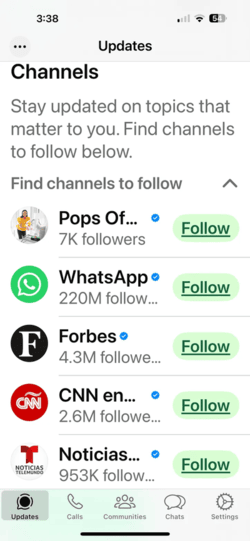
Image: Aletta Cooke
WhatsApp remains a reliable choice with a huge user base, especially internationally. However, its ownership by Meta raises some ongoing privacy concerns even with end-to-end encryption. Also note that because WhatsApp is owned by Meta, it may share some data with Facebook.
While WhatsApp may not have all the bells and whistles of Telegram, like full-blown custom themes and extensive chatbot options, it still allows for a good deal of personalization. You can set custom chat wallpapers, choose from a library of stickers and GIFs, and even create your own sticker packs. The core messaging, group chat, and calling features are top-notch, especially for connecting with contacts around the world.
3. iMessage
.png "iMessage Logo")
Best for: Apple users
Native for iPhone users
What's cool about it: iMessage supports RCS on Android, so you see typing indicators and read receipts. It’s also highly secure with end-to-end encryption.
Features worth mentioning:
- Seamless integration with Apple services
- Apple Pay for sending money
- Animoji and Memoji
- Inline replies and mentions
iMessage seamlessly syncs across iPhone, iPad, Mac, and Apple Watch, making it effortless to carry on conversations across devices. It's also highly secure, with end-to-end encryption protecting every message. You can customize chats with Memoji stickers, bubble effects, and third-party apps. I had a blast creating a cartoon avatar that looked just like me, complete with my favorite sunglasses and hairstyle. Sending Memoji stickers and animations in chats added a fun, personal flair to my messages.
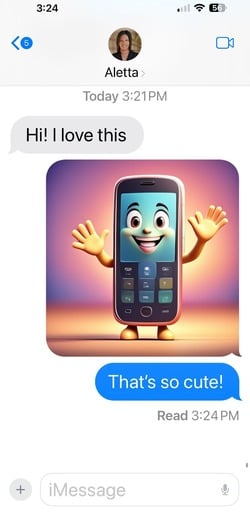
Image: Aletta Cooke
iMessage's new RCS support means Android users can join the fun without losing key features like typing indicators and high-res media. However, if you don't have an iPhone, using iMessage is a bit trickier. There are some workarounds involving Mac computers and Apple IDs, but the solutions are clunky. For the best iMessage experience, you and your contacts really need to be on Apple devices.
iMessage not working?
iMessage is slick and easy to use—but, nothing’s perfect, and sometimes iMessage can glitch out on you. If you’re tired of dealing with a buggy iMessage, check out our guide on common fixes for broken iMessage issues.
4. Telegram

Best for: Feature lovers
Free from Apple and Google
Why people like it: Telegram is packed with features, from chatbots to self-destructing media and customizable themes.
Standout features:
- Customizable themes and backgrounds
- Channels for large audiences
- Powerful chatbots
- Up to 2GB file sharing
My take: Telegram is absolutely packed with features, making it the best messaging app for power users. The app allows you to heavily customize your chats with unique themes, colors, and backgrounds. I set a custom chat background using a beautiful landscape photo I took on vacation, which gave the app a personalized touch. The process was intuitive, and the result looked great.
.png "Telegram screenshot on an iPhone")
Image: Aletta Cooke
Telegram supports massive group chats with up to 200,000 members, making it ideal for communities and large-scale collaboration. The ability to create your own chat bots opens up a world of possibilities. However, the massive array of options could be overwhelming for some users. Additionally, the end-to-end encryption isn't enabled by default like Signal.
5. Discord

Best for: Communities
Free from Apple and Google
How it's different: Discord started as a gamer chat app but now hosts communities with both private and public servers.
Best features:
- Themed servers with topic-based channels
- Voice and video chats
- Robust moderation tools
- Bots for server management
My experience: I had a blast joining Discord servers for some of my favorite games and hobbies. Voice chatting while playing Fortnite was seamless, and I love all the custom emojis. I was impressed by the utility of Discord's chatbots. On one server, I interacted with a bot called “Pokécord” that let me “catch” and collect Pokémon within the chat. It was a fun diversion that showcased the app's versatility.

Image: Aletta Cooke
As a community-oriented chat app, Discord excels with powerful tools for server owners and a fun, laid-back vibe. But its core messaging functionality is fairly standard, and the app's design is geared more towards group chats than individual messaging.
Discord's gaming-centric culture and aesthetics may be off-putting or confusing to non-gamers. The app doesn't put one-on-one messaging front and center like other apps.
Additionally, servers can get chaotic, with thousands of members posting memes, GIFs, and jokes simultaneously. However, server owners have robust moderation tools to keep things under control, like assigning roles, muting troublemakers, and creating focused channels.
Bottom line: Which messaging app is the best for you?
If privacy is paramount, Signal is your best bet. If you mostly chat with iPhone users, iMessage is ideal. WhatsApp works well for international communication, Telegram caters to feature lovers, and Discord is a powerhouse for communities.
Don’t let messaging apps drain your data
Sending all of those GIFs and Memojis can burn through your data fast. Make sure your phone plan can handle the data demands of these apps; even the best messaging tool needs good coverage and enough data.
We've reviewed every major carrier and popular MVNO carrier, and our testing has shown you don't need to spend more than $50/month for a high-quality data plan. Our favorites include:
- Visible's $25/month plan: This option is an excellent choice for avid messengers, offering unlimited data on Verizon's reliable 5G and 4G LTE networks. Plus, with unlimited mobile hotspot data at 5Mbps, you can easily stay connected on your laptop or tablet.
- Mint Mobile's Unlimited plan: This is another strong contender—for just $30/month ($15/month for the first 3 months), you get 50GB of premium data on T-Mobile's nationwide network. Send messages, make voice and video calls, and share media before any chance of a slowdown.
- US Mobile's Unlimited Premium: For the heaviest data users, this plan is hard to beat. For $44/month, you'll get unlimited premium data with access to all three major U.S. networks, ensuring buttery-smooth performance for even the most demanding messengers. The plan also includes 50GB of high-speed hotspot data, perfect for staying connected on other devices.
-
T‑Mobile's Essentials plan: This plan offers unlimited 5G & 4G LTE data on the carrier's rapidly expanding nationwide network. You'll get 50GB of premium data and unlimited hotspot at 3G speeds—but if you need high-speed hotspot, you can purchase add-on gigs. You’ll enjoy steady service for chatting, calling, and sharing without breaking the bank.
|
US Mobile

Unlimited Starter Plan
$25.00/mo
|
|
Visible

$25 Visible Plan
$25.00/mo
Taxes & Fees included
|
|
Mint Mobile

Unlimited Data Plan
$25.00/mo
$75.00 upfront payment for 3 months (equals to $25.00/month). Intro pricing for new customers only.
|
|
T-Mobile

Prepaid Unlimited Plan
$45.00
Per 1 Month Refill
with AutoPay - Taxes & Fees NOT included
+ $10 Upfront
|
Best messaging apps: FAQs
Which messaging apps are the safest?
Signal is widely considered the gold standard for secure messaging, as all communication is always end-to-end encrypted. iMessage is also very secure with encryption and other privacy protections. WhatsApp messages are encrypted, but the app shares some metadata with its parent company, Facebook. Telegram offers encrypted "secret chats," but not by default.
Are messaging apps more secure than texting?
In general, messaging apps are more secure than texting. Most messaging apps use some form of encryption, while standard SMS texting does not. iMessage and Signal are fully end-to-end encrypted, meaning no one can intercept your messages. WhatsApp and Telegram also offer encryption but have other potential privacy trade-offs. SMS messages could theoretically be read by your carrier (or hacker).
Can I use these apps to message people in other countries?
You can use all of these apps to message people in other countries as long as the person you're messaging also uses the app. WhatsApp and Telegram are especially popular internationally. Just watch out for data roaming fees if you're texting over cellular data abroad—consider getting an international phone plan or using Wi-Fi while traveling.
My messages are slow to send or not going through. What’s wrong?
There are a few potential culprits for slow messaging issues:
- Weak cell signal or internet connection: Try turning on Wi-Fi or moving to an area with better reception. If problems persist, you may need a carrier with better coverage.
- Outdated app or OS: Check for any updates to the messaging app or your phone's operating system. Keeping your software current often fixes bugs.
- Server outage: Occasionally, an app's servers may be down for maintenance or due to a technical issue. Check the app's status page or social media for updates.
- Recipient's phone is off or has Do Not Disturb turned on: If you're not seeing read receipts or a "delivered" status, the recipient's phone may be powered off or have notifications silenced.
If issues continue, try restarting your phone or uninstalling and reinstalling the app. You can also reach out to the app's support for further troubleshooting.
Can I use stickers, GIFs, and other fun chat features on any messaging app?
Most modern messaging apps offer things like stickers, GIFs, and message effects to liven up your chats. The exact options vary by platform.
iMessage has Animoji, Memoji, and screen effects built in. Telegram and Discord both allow custom stickers and GIFs. WhatsApp has a library of pre-made stickers plus the option to make your own. Signal is a bit more bare-bones, with a smaller selection of emojis and stickers for download.
If you're a fan of fun chat features, Telegram and Discord offer the most options for customization, while iMessage has the slickest interface and most seamless integration. But even the most security-focused apps recognize the importance of some whimsy.
Aletta Cooke
Staff Writer

Find a better phone plan
Thousands of cell phone plans unpacked. All the facts. No surprises.