
Apple is overhauling its parental controls in iOS 27. The new tools are organized around a simple framework: what your kids can see, who they can talk to, when they can use their device, and how you keep tabs on all of it.
All of these new features will require an Apple Child Account, which is required for kids under 13 and available up to age 18. Setting one up is the first thing Apple walks you through when configuring a new device for your child. If your kid is already on an iPhone without one, it's worth setting up before iOS 27 arrives this fall.
What kids can see
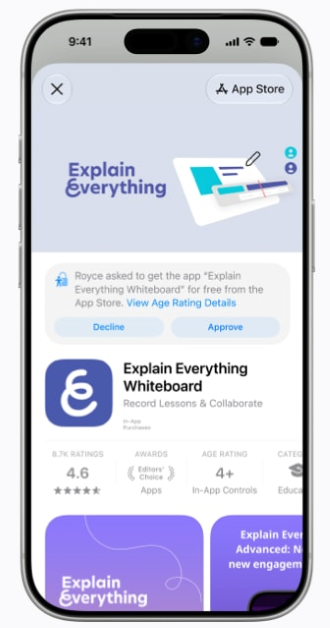
before downloading a new app.
Image: Apple
When setting up a Child Account in iOS 27, parents choose exactly which apps are available on their kid's device from day one. Apple gives you the option to start with a small set of essential apps, a broader recommended set, or a fully custom list.
Two approval features extend that control as kids try to expand beyond the starting set:
- Ask to Buy: Kids need a parent's approval before downloading any app from the App Store, free or paid.
- Ask to Browse: Kids have to request permission before visiting any new site in Safari. It works across iPhone, iPad, and Mac.
Who kids can talk to
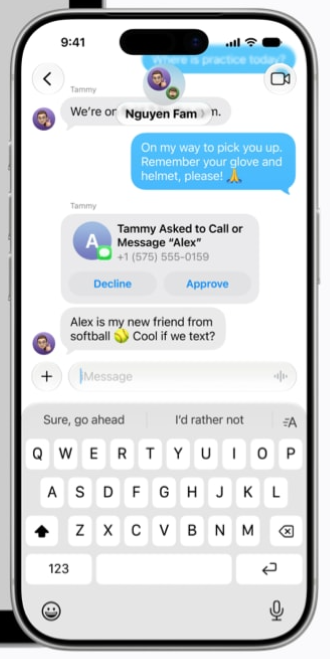
new contacts in Messages, FaceTime, and Phone.
Image: Apple
Parents can manage which contacts a child can reach over Messages, FaceTime, and Phone. Beyond the approved list, kids can be required to get parental sign-off before adding anyone new.
There is also a big update to Communication Safety. According to Apple's announcement, the feature blur feature is also expanding to cover violent and graphic content in shared images and videos as well.
When kids can use apps
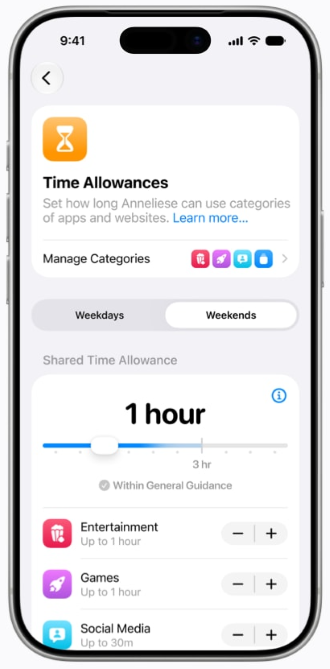
Games, and Social Media categories.
Image: Apple
Time Allowances let parents set daily limits by app category, including Entertainment, Games, and Social Media. When you configure them, Apple offers age-based suggestions drawn from expert research as a starting point.
Alongside Time Allowances, parents can create daily Schedules that restrict access to certain apps at specific times. The obvious use case is school hours, but it also works for bedtime routines, family dinners, or any other block of time where you'd rather your kid not have a phone in their hand.
How parents stay informed
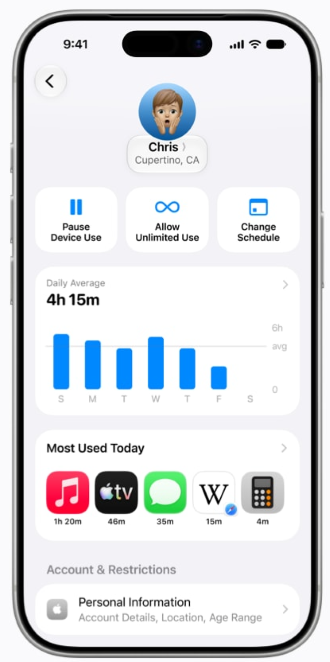
shows daily average usage.
Image: Apple
Screen Time has been redesigned with a cleaner dashboard that shows daily average usage and most-used apps in one place. It also lets parents act directly from that view to pause device access entirely with a single tap, or extending access when a kid needs a few more minutes to finish something.
iOS 27 parental controls: FAQ
Do I need a Child Account to use the new iOS 17 parental controls?
Yes, an Apple Child Account is required for these features. Children under 13 are also required to use a Child Account, and they are available for users up to age 18. Apple walks you through creating one when setting up a new device for a child, or you can set one up manually through Family Sharing in Settings.
Does Ask to Browse work on all browsers, or just Safari?
Based on Apple's announcement, it appears Ask to Browse works in Safari across iPhone, iPad, and Mac. Third-party browsers are not mentioned as part of the feature. If your child uses Chrome or another browser, that access would likely need to be managed separately, either by restricting those apps using a third-party parental content manager or removing them from the approved app list entirely.
Can kids bypass Time Allowances?
Kids can request an extension when they hit their limit, which parents can approve or deny. They can't override limits on their own without the parent's Screen Time passcode. That said, no technology is perfect, and a determined teenager with enough time may find a workaround.
How do I access the iOS 27 parental controls?
You'll need to download iOS 27 once it's available this fall. Our guide to the latest version of iOS has details on when it's coming and how to update your iPhone when the time comes.
Which iPhones support the new iOS 27 parental controls?
Apple confirmed that iOS 27 supports the same devices as iOS 26, including all iPhones going back to the iPhone 11, plus the iPhone SE 2nd and 3rd generation.
Max McCaskill
Sr. Staff Writer

Find a better phone plan
Thousands of cell phone plans unpacked. All the facts. No surprises.


.png?w=280&h=280&usm=20&usmrad=0.8&fit=crop "The Best Family Cell Phone Plans for 2026")


