

You know the group chat where you're trying to plan something and half your messages get buried under memes, two people never respond, and nobody can remember if Sarah said she's vegetarian or just doesn't eat red meat?
Paperless Post solves that entire nightmare by managing beautiful invites, RSVPs, and questions.
RSVP tracking and custom questions
This app handles invitations the way they're supposed to work—with actual responses, tracked RSVPs, and the ability to collect information without playing detective through scattered text threads.
When I browsed through the templates for testing, the Valentine's Day and Galentine's designs were genuinely adorable. I would struggle to create something this polished on Canva, so having pre-made designs available saves both time and creative energy.
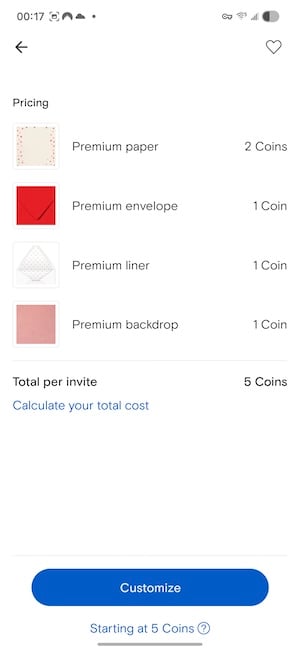
Image: Jessica Santero | WhistleOut
You can track RSVPs in real-time as people respond through Paperless Post, send invitations via text, link, or email depending on what works for your group, and add custom questions to collect dietary restrictions or plus-one information. Everything you need to know lives in one organized dashboard instead of scattered across your notes app.
Understanding Paperless Post pricing
Now, the pricing situation for Paperless Post can add up quickly. The really cute, show-stopping designs cost money. If you want something truly elegant, you'll pay for each element—the design, the paper style, even the digital envelope. Plus, you pay per invitation sent, which is costly for larger guest lists.
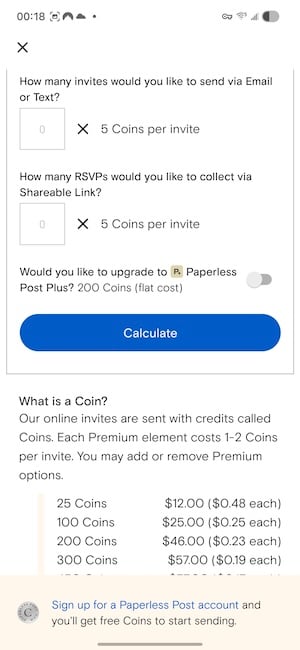
Image: Jessica Santero | WhistleOut
That said, it's still cheaper than physical cards and stamps, and a special occasion deserves something more elegant than "party at my house" dropped into a group chat.
📊 Tired of watching your data disappear?
Between scrolling event photos, streaming music for your gathering, and video chatting with friends who can't make it, your data usage spikes during celebration planning. Why worry about overage charges when you could just switch to unlimited?
Check out our guide to the best unlimited data plans and stop rationing your phone usage. Here are the most popular unlimited options:
|
Visible

$25 Visible Plan
$25.00/mo
Taxes & Fees included
|
|
Mint Mobile

Unlimited Data Plan
$25.00/mo
$75.00 upfront payment for 3 months (equals to $25.00/month). Intro pricing for new customers only.
|
|
T-Mobile

Essentials Saver
$50.00/mo
with Auto-Pay - Taxes & Fees NOT included
|
One legitimate concern with digital invites is phishing scams. One Reddit user warned that scammers create fake Paperless Post-style links to steal sensitive data. Only send invitations through the official Paperless Post platform, and warn your guests to verify the sender before clicking any links.
For party planning, Paperless Post works best if you're organizing something that requires coordination—tracking who's attending, collecting dietary needs for a dinner party, or coordinating contributions for a potluck. If you're just grabbing drinks with three friends, a regular text probably suffices.
Upgrade your group chat experience
Standard SMS group chats are a nightmare of missed messages, low-quality photos, and that one friend on Android who ruins the iMessage experience for everyone.
Check out our guide to the best messaging apps for better options that work across all devices.
Download Paperless Post and pricing
Paperless Post is available on both iOS and Android. Free templates are available, but premium designs cost $3–$5 per invitation depending on complexity.
Start with free templates to test the platform, then upgrade to premium designs if you want something more polished for your celebration.
Paperless Post: FAQ
Is Paperless Post actually free?
Basic invitations on Paperless Post are free, but premium designs with polished templates and custom envelopes cost money.
Can I track RSVPs with Paperless Post?
Yes, the app tracks RSVPs in real-time and lets you add custom questions to collect dietary restrictions, plus-one information, or any other details you need.
Are Paperless Post invitations safe from scammers?
Only send invitations through the official Paperless Post platform, as scammers sometimes create fake invitation links to steal data. Make sure to warn guests to verify the sender before clicking.
Is Paperless Post better than group texts?
Paperless Post is better than group texts if you want a unique invitation for a special event. Since you can collect RSVPs and dietary restrictions, a Paperless Post is best for bigger events.
How WhistleOut reviews apps
Our mobile experts scour the app stores, looking for the best new apps for Android and iPhone. Before recommending an app, we use the app for at least one full workday, testing its basic functionality and evaluating whether or not it delivers on its promises.
- Easy to use
Great apps simplify your phone. We selected the tools that don't require a complicated instructional manual. - Affordability
The internet is filled with expensive price tags, but we're not buying what they're selling. We leaned into inexpensive, quality apps. Extra points if they're free! - Hands-on testing
We played around with these before recommending them, ensuring they're worth your download.
From there, we weigh the app's pros and cons and then determine whether or not it's a worthwhile download for the wider population of cell phone users.
Jessica Santero
Staff Writer

Find a better phone plan
Thousands of cell phone plans unpacked. All the facts. No surprises.


.png?w=280&h=280&usm=20&usmrad=0.8&fit=crop "Cheap Unlimited Data Plans from $25/Month")


.png?w=280&h=280&usm=20&usmrad=0.8&fit=crop "Best Cell Phone Deals for June 2026: Get the New iPhone 17 for Free")

