
Apple Fitness+ is Apple's workout subscription for Apple Watch owners. While you work out, your heart rate, calories burned, and activity ring progress appear directly on the workout video. You don't need to glance at your watch, pause the class, or switch apps anymore.
Sessions run in 10, 20, and 30-minute increments across HIIT, strength, yoga, kickboxing, Pilates, core, cycling, rowing, treadmill, and dance. The subscription costs $9.99/month or $79.99/year, and it requires an Apple Watch to use.

Apple Fitness+
- Price: $9.99/month or $79.99/year
- Platforms: iOS (Apple Watch required)
What separates Apple Fitness+ from other workout apps
Most workout apps display your metrics separately from the workout video — you have to alt-tab between your health app and the class, or glance at a separate screen. Apple Fitness+ puts everything on one screen.
Your heart rate appears in the bottom corner, your calories update in real time, and your activity ring progress shows your effort relative to your daily goal, all while the workout video plays. It's a small detail that makes a surprisingly large difference when you're mid-workout and don't want to think about anything except finishing the set.
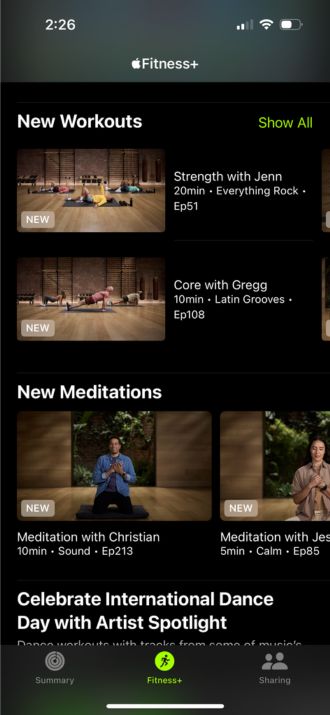
Image: Angelo Ilumba | WhistleOut
The Apple Watch integration also means your activity closes naturally during Apple Fitness+ sessions. Completing a workout class counts toward your daily Move, Exercise, and Stand goals the same way a manually logged session would.
Streaming Fitness+ while abroad?
Casting Apple Fitness+ classes to a TV or streaming them away from home uses data. International plans that include data abroad mean you're not paying overage charges for a 20-minute HIIT class.
Here are the most popular plans with international data:
|
T-Mobile

Experience More
$85.00/mo
with Auto-Pay + Taxes and fees
|
|
Verizon

Unlimited Ultimate
$85.00/mo
+ Taxes & Fees. Price includes AutoPay & Paperless discount.
+ $40 Upfront
|
|
AT&T

Premium 2.0℠
$90.00/mo
+ $35 Upfront
|
Short sessions that fit real schedules
The 10, 20, and 30-minute session format is the reason Apple Fitness+ actually works for people who struggle with consistency. A 10-minute core session requires less mental negotiation than any other type of workout commitment, and the quality is high enough that those 10 minutes actually do something.
New sessions are added weekly across all categories, so the catalog doesn't get stale. Apple also adds themed collections and multi-week programs for specific goals, which gives you a structured path if you want one without making it mandatory if you don't.
What equipment do you need?
Most sessions in Apple Fitness+ require nothing more than a mat and your body. Strength sessions typically call for a set of light and medium dumbbells, and some Pilates sessions use a resistance band. The app tells you what each session needs before you start, so there are no surprises mid-workout.
You can stream sessions to your iPhone, iPad, or Apple TV. On Apple TV, your watch metrics appear on the big screen, which is the best way to use the app. On iPhone, the workout plays in the app and your metrics appear in the bottom corner of the video.
Not sure how to update your apps?
Keeping your apps up to date ensures you're always getting the latest features, bug fixes, and security improvements. Learn how to update the apps on your iPhone and your Android. It takes less time than you think.
Who is Apple Fitness+ for?
Apple Fitness+ is built entirely around the Apple Watch, which means it starts and ends with whether you own one. If you already wear an Apple Watch, Fitness+ is the workout subscription that uses it best.
If you don't own an Apple Watch, the app doesn't exist for you. Android users should look at Peloton or Nike Training Club, both of which are strong alternatives that don't require Apple hardware. Even among Apple Watch owners, if you're primarily a runner with a Garmin or a cyclist using Zwift, the Fitness+ library is best as a supplement rather than a replacement for those apps.
For the full breakdown of every option in this category, see our best health and fitness apps guide.
 How I tested Apple Fitness+
Apple Fitness+ was evaluated based on class quality, session format variety, Apple Watch integration functionality, pricing and subscription structure, and platform requirements. Testing included sessions across HIIT, yoga, and strength categories. Current user reports and app store reviews were used to supplement hands-on evaluation. All pricing and feature details were verified at the time of writing.
Why you can trust WhistleOut
.svg)
15+
years of mobile industry experience

900+
published wireless guides

35+
firsthand carrier reviews
We've been around since the birth of the iPhone. Along the way, we've learned how to spot the best deals for your wallet (and your sanity). We spend our days researching informative guides and writing insightful reviews on every kind of wireless plan, distinguishing what matters from what doesn't. We played around with these plans before recommending them, ensuring they're worth your hard-earned money.
Want to know more? Check out how we review every cell phone plan we rank.
Apple Fitness+ FAQ
Do you need an Apple Watch to use Apple Fitness+?
Yes, an Apple Watch is required. The app's real-time metrics display pulls data directly from the watch, and an Apple Watch is needed to complete a session.
How much does Apple Fitness+ cost?
Apple Fitness+ costs $9.99/month or $79.99/year. It's also included in the Apple One Premier bundle subscription.
What workouts does Apple Fitness+ include?
HIIT, strength, yoga, kickboxing, Pilates, core, cycling, rowing, treadmill, and dance. Sessions run in 10, 20, and 30-minute increments with new sessions added weekly.
Does Apple Fitness+ work on Android?
No, Apple Fitness+ does not work on Android. Android users should look at Peloton or Nike Training Club instead.
Jessica Santero
Staff Writer

Find a better phone plan
Thousands of cell phone plans unpacked. All the facts. No surprises.





