
FitNotes is an Android gym log that does exactly one thing: tracks your workouts with the minimum friction possible. You pick an exercise, log your sets and reps, and move on. The entire app is free, there are no ads, and there's no subscription tier waiting to interrupt you.
After 20 years of trying to track my gym sessions in notebooks, the Notes app, and Google Sheets, FitNotes is the first one that actually stuck.
Logging is faster than writing in a notebook
A workout in FitNotes starts with picking a date (today, by default), then tapping through to add exercises. The app has a full library of gym movements organized by muscle group, and you can add custom exercises if something isn't listed.
Each exercise entry is just weight, reps, and a save button. There's no AI-generated structure, no mandatory warm-up logging, and no screens to navigate through before you can record a set.
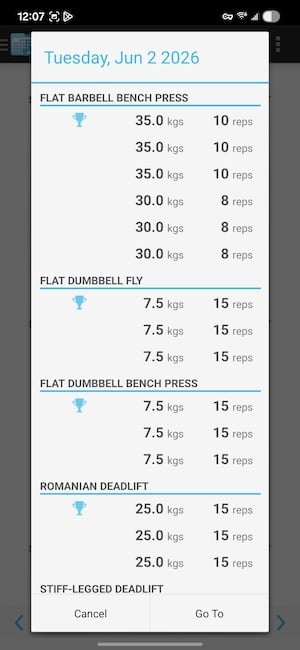
Image: Jessica Santero | WhistleOut
The app works completely offline. That means there's no account required, no sign-in, no permission to access your contacts. You open it, log your session, and close it. It stores everything locally on your device.
Log your workout on the go with unlimited data
Make sure you can stick to your fitness goals this summer by logging your workouts away from home. Most apps use data when away from Wi-Fi, so make sure you have enough for your upcoming vacation.
Here are the most popular unlimited data plans to pair with a new Android phone:
|
Visible

$25 Visible Plan
$25.00/mo
Taxes & Fees included
|
|
Mint Mobile

Unlimited Data Plan
$25.00/mo
$75.00 upfront payment for 3 months (equals to $25.00/month). Intro pricing for new customers only.
|
|
T-Mobile

Essentials Saver
$50.00/mo
with Auto-Pay - Taxes & Fees NOT included
|
The analysis view reveals what you're actually training
After a few weeks of logging, FitNotes can show you a breakdown of your training volume by muscle group. I found out I was dedicating significantly more volume to pushing movements than pulling ones, which explained a shoulder issue I'd been managing for months. Seeing it in numbers made it impossible to ignore in a way that suspecting it never did.
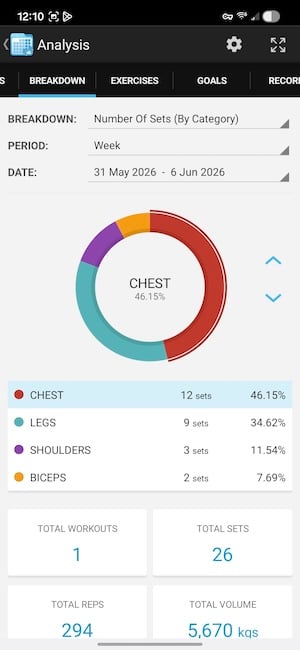
Image: Jessica Santero | WhistleOut
The exercise history view shows every session for any given movement in order, with personal bests highlighted. You can see whether your bench press is going up over time, when you hit a plateau, and what weight you started at months ago. And FitNotes gives it all to you for free.
Workout notes and bodyweight tracking
Each logged workout can include a note. You can type in details you want to remember, like if you trained after a bad night of sleep, felt unusually strong on a given day, or were recovering from a hard leg session before a run. That context sits alongside the data when you review your history, which is something spreadsheets and basic logs don't give you.
FitNotes also has a built-in bodyweight tracker. Log your weight when you arrive at the gym, and the app tracks the trend over time alongside your workout data. Seeing strength gains relative to bodyweight changes gives you a much clearer picture of progress than sets and reps alone.
Not sure how to update your apps?
Keeping your apps up to date ensures you're always getting the latest features, bug fixes, and security improvements. Learn how to update the apps on your iPhone and your Android. It takes less time than you think.
The limitations to know before downloading
FitNotes is Android-only. If you use an iPhone, the app doesn't exist for you—use the free tier of Hevy instead, which is available on both platforms.
There's no cloud sync, which means your history lives entirely on your device. If you switch phones or lose your phone, your workout data doesn't automatically carry over. You can manually export your data as a backup, but it requires remembering to do so. For a structured training program with periodized plans built in, FitNotes also falls short. It's a log, not a coach. For anything beyond logging, you'd want to pair it with a training plan from another source.
For iPhone users and anyone who wants a broader exercise library or social features, see the Hevy review in our best health and fitness apps guide.
 How I tested FitNotes
FitNotes was evaluated through multiple gym logging sessions covering strength training across different muscle groups. Testing focused on logging speed, exercise library depth, the analysis view's muscle group breakdown, and the personal best tracking feature. The app was compared directly against Hevy for feature parity and ease of use. All feature details were verified at the time of writing.
Why you can trust WhistleOut
.svg)
15+
years of mobile industry experience

900+
published wireless guides

35+
firsthand carrier reviews
We've been around since the birth of the iPhone. Along the way, we've learned how to spot the best deals for your wallet (and your sanity). We spend our days researching informative guides and writing insightful reviews on every kind of wireless plan, distinguishing what matters from what doesn't. We played around with these plans before recommending them, ensuring they're worth your hard-earned money.
Want to know more? Check out how we review every cell phone plan we rank.
FitNotes: FAQ
Is FitNotes free?
Yes, FitNotes is completely free with no ads, no in-app purchases, and no subscription. Everything in the app is available from the moment you download it.
Is FitNotes available for iPhone?
No, FitNotes is Android-only. iPhone users should try the free tier of Hevy, which is available on both iOS and Android and covers the same essential logging features.
Does FitNotes sync to the cloud?
No, all data is stored locally on your device. Manual export is available as a backup, but there's no automatic cloud sync if you switch phones.
What does the FitNotes analysis view show?
It shows your training volume broken down by muscle group as a percentage, plus full exercise history with personal bests highlighted for any movement in the app.
Jessica Santero
Staff Writer

Find a better phone plan
Thousands of cell phone plans unpacked. All the facts. No surprises.





